Where To Golf -A Golfist Review

The video is a demo of the capabilities of Where To Golf. I will give it a spin and give my two cents. It is currently on sale for a special rate of 0.99 USD. I once thought, well, for free or just under a buck, what’s not to lose by loading the program and trying it out?

For the most part -free stuff is hit or miss. Both categories -cheap and free, do annoy me when they take up valuable space, not do what they are intended efficiently, and worst of all -crash the iPhone which for me is “mission critical.” Being on AT&T in Des Moines is dodgy enough. Having to reboot the phone is really bad -something that I associate with Windows Mobile phones.

The worst free app -the NY Times App -I really hate it. Every few months, I reload the dang thing on my iPhone and try to love it but become stupefied by its slowness and tendency to freeze up the phone.

Because I am willing to go long crazy distances for good golfing experiences, having quick access to a formatted database such as this is potentially useful. So here are a list of my expectations based on my personal needs before I even try the app:

  1. good user reviews of courses -no one line flames and h8trs
  2. ability to upload reviews from non-app sources not typed on iPhone of which the entry method lends itself to one liners
  3. ability to easily request courses
  4. broad database of at least the major public and accessible private courses in every burg and county -Doral is a no brainer, but knowing that a small farm community has a nice 9 or 18 hole track is useful information in planning your life around golf
  5. speed and efficiency
  6. stability
  7. beauty
  8. course layout/scorecards
  9. course slope, handicap, and USGA number for posting of handicaps
  10. posting of handicaps -please someone make this a smooth process when playing away from your home course

So there you go. It’s suppose to rain today, but barring a tornado, I’m playing. I have great Nike rain gear that lets you get hosed down and still stay warm and dry.

Addendum 4/17/2009

Launching the application gives you four methods of searching the database:  course name, city, zip code, and GPS location. Choosing location, img_0001I get the search list to the right. It has most of the public courses around here, and also includes Ponderosa which no longer exists having been turned into a modern village/pedestrian community of condos, shops, and community meeting places. It was actually the first course I played in Iowa in 2004, but hasn’t been around since 2005. This screenshot was from earlier in the day, and listed courses within about a half hour driving distance but was missing The Legacy which was where I played today. Now, it shows up -I’ve also just started getting followed by WhereToGolf on Twitter. It’s a strange coincidence. My wife tells me my favorite song goes, “Me, me, me, me.” But this is evidence that when it comes to golf, strange things do occur.

Choosing The Legacy, options to call the course, find the course on Google Maps App, and review. You can write your own review which I will do. Launching Google Maps quits you out of Where to Golf, but that is a feature of the iPhone OS.

It is a nice database client -I wish electronic medical records could be as straightforward with their user interface.

It competes with View Ti’s course finder feature, but at least as a start here in Iowa, Where To Golf is more comprehensive, and seems to update before my very eyes.

Given its 0.99 cent price, you can’t beat it because the cheapest flavor of View Ti goes for around ten bucks (the View Ti crew change the price frequently, and have about five to seven different versions -they must be getting their clues from the Windows Vista marketing people).

The call function is a killer function! You figure out what courses are nearby and then call them for tee times -can’t get much better.

As with View Ti -I will keep addending as I come up with thoughts but at least on the first day of use, it does have a reasonable database of local courses (but not all -will check later today and see what else new comes up).

I suppose the next thing to add that no one else has is a way to search for practice facilities, golf shops, and teaching pros/schools.

Addendum 4/22/2009

Got that powerful golfing jones and I booked out of work to get in 9 holes as it hit 78 degrees today in Des Moines. As I was tooling down the expressway, I couldn’t remember the exit. My car’s GPS only has eateries. I open up Where to Golf, press “location” and find Waveland -my destination. I choose map and voila -came up on Google Maps app -it took one more button click to get a route and the exit. Amazing!

The iPhone is the Master

img_0002Exclusive to iPhone, the Master’s app available only for iPhone is amazing. It features a live leaderboard and video feed from Amen Corner, 15 & 16, and video from the broadcast. The video over 3G, is superb, and it really highlights the iPhone’s versatility. img_0003This tournament is always beautiful to watch, and to be able to carry the whole tournament in your pocket is amazing. img_00021The picture to the left is live video!

The program is responsive, fast, and stable. I don’t know how Apple got the nod, but I suspect that quality has a lot to do with it.

I recently purchased the MLB app as well -I listened to the WCBS broadcast of the Yankees/Orioles game last night on the drive home. The 3G network shows its strengths and weaknesses. It streams fast, but its coverage is unreliable.

I get the feeling that tower to tower handoff is poor with my current iPhone. Just as phone calls drop while on the move, 3G coverage is dicy in a moving car.

On Wifi, the app is unbelievable. This is going to be a very unique Masters.

Review of iPhone Kindle App

img_0003It was with some dubiousness that I downloaded the Kindle application. I already have 8 pages of apps, and I really only use a handful at any given moment. The application runs without a hitch, but I didn’t have any books. 

I scooted over to Amazon, to my account, and I purchased the excellent book, Tales from Q School: Inside Golf’s Fifth Major by John Feinstein. I bought it with a gift certificate (another story), and then nothing. I shrugged, and went about my business.

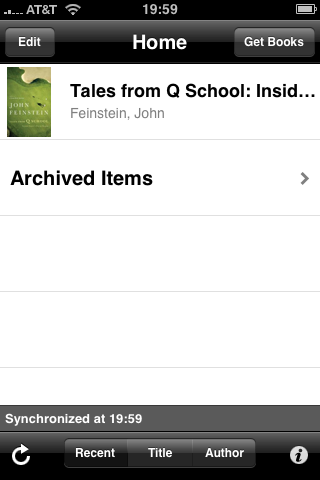
Later, I fired up the application, and lo and behold, the book was img_0004on the list! Tapping on it, a very readable rendering of the book came up. 

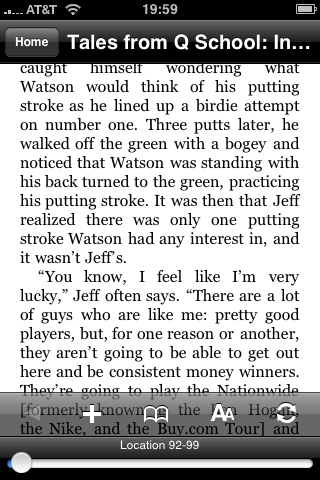
The font is resizable, and the application takes it in stride. I have used other reader software, and this can be a complicated process. 

Turning the page is merely sweeping the page to the right. I read half the book with no eye fatigue. It is fantastically easy to read on the Kindle App. This is remarkable.

My prior experience with ebooks has been the awkward transfer of ebook files -the downloading and the purchasing is always a drag. The ebook stores that I have perused have a limited number of books that I actually want to read. This is substantially not the case with the Kindle app. img_00051

The NY Times bestseller list, the deep catalog of recent books on Amazon, this is the scale that Amazon brings. 

Whisper Sync is the killer app of the whole deal. I bought the ebook online, and it shows up basically instantly on my index of books. This is not only cool, but going to make Kindle the leader in all of this.

This leaves Sony out in the cold again. They just don’t get the modern economy and haven’t evolved past the cassette walkman in terms of business models. 

The drawbacks are due to the screen technology. The Kindle draws power when a page is turned. The e-ink maintains its image without drawing further current. Reading a book on iPhone results in a significant battery drain -about half the battery for half the book or two hours of reading which is on par with video watching or gameplay. 

And finally, the application does exactly what its suppose to which is convinces me to go and get a Kindle 2!

The un-iPhone: A Review of Nokia N810 -an iPhone User’s View

img_2042

Moore’s Law, the observation that processor speeds double every few years, has hit the other principle, the law of dimishing returns. Once computers can reliably do the following, list below, any increase in processor speed or other tech spec is frivolous:

1. Connect to the web
2. Get and send email, photos, and video
3. Process text, spreadsheets, and presentations
4. Keep track of schedules and tasks
5. View documents, pictures, and video
6. Communicate by voice and video
7. Play music, movies and television
8. Play games
9. Blog

There is really no great need for the latest processors or gizmos once a device can do the above reliably. To make money, you have to innovate or you sell upgrades of broken software. This is why Apple has triumphed by creating a device that does all of the above with panache in a pocketable package. But in getting there it created compromises (12 things I hate about iPhone), which made me try out the N810.

It was after a great deal of research that I finally broke down and purchased the Nokia N810. I had been complaining about the iPhone and its deficiencies, and even with iPhone 3.0 which came out yesterday. Apple has been determinedly avoiding creating a competitor to its MacBook, iMac, and PowerMac’s. This means keeping everything aside from the making of simple emails, playing songs, and launching apps completely hidden.

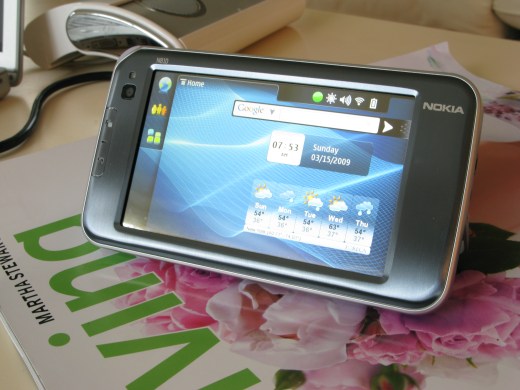
The N810 is an internet tablet which in many ways is the un-iPhone. It runs a flavor of Linux designed for ARM processors, and potentially the iPod Touch could run it. It has a physical keyboard. I wrote this review on it using LeafPad, an open source project available for free download. Nokia appears to have built the N810 for geeks, because I see no obvious business use. It only connects via wifi 802.11g, although they offer a Wimax version. But it has several things going for it that trump iPhone: the keyboard, bluetooth keyboard capability, and communications via Skype and Google.

First Impressions
The device out of the box is gorgeous. All brushed aluminum in grays and blues that are dressy and corporate. It has none of the tacky garishness of some of the Windows Mobile phones. The slideout keyboard works nicely and there are just enough buttons.I think iPhone doesn’t have enough -particularly a keyboard. There is a forward facing videocamera for chatting and a popout easel stand -perfect for using with a bluetooth keyboard.

Turning On
This is one dislike -the device requires a bootup but the device behaves like a smartphone in that it quickly spools into standby mode which the battery meter will tell you is good for almost a week. Bootup takes less than a minute. I would much prefer instant on. After some use, I realized that you aren’t meant to turn off the machine after bootup. It goes into a sleep mode and you can keep it in standby for days. A tap on the screen brings it back to life. With average use, I’m getting about 7 hours of battery life. This far exceeds the iPhone, which frankly is under-batteried for the ways that I was using it.

Software
The device needed to be upgraded to the current OS version which I had to do via a Windows computer. Not a big deal, and it enhanced stability.

It comes with a very capable web browser that renders full pages quite well. It has a dedicated zoom rocker switch that lets you adjust to comfort level. Also, there is a dedicated full screen button. It has Flash, which empowers this device for web 2.0. Unfortunately, it is an older Flash and some web sites, including Hulu won’t run, but Youtube and videoclips off NYTimes ran okay, if a bit choppy.

Multitasking is smooth and it has copy paste. Pressing the x cleanly ends the program, unlike Windows Mobile which has muddled way of dealing with multiple processes -namely it doesn’t and Windows Mobile devices get easily gummed up.

It works perfectly as a communicator -it notifies you of incoming text messages via skype, google, and aol and presumably msn via a number of programs. Unfortunately, skype’s client doesn’t have video chat yet.

Email is functional and straightforward. The client that comes with the N810 is spare and straightforward, but has a limited feature set. A more feature rich client, Claws Email is available for free download from Maemo.org.

The un-App Store – the Apps are open source and free. What isn’t available are PIM and Office software -I don’t think anything matches the utility of Documents to Go for the Palm OS. Everyone is waiting for someone to port OpenOffice, but I know it will run very slowly. There are some who have hacked Debian or Ubuntu Linux to run on this device but it slows down when programs meant for laptops and desktops run on what is a smartphone.

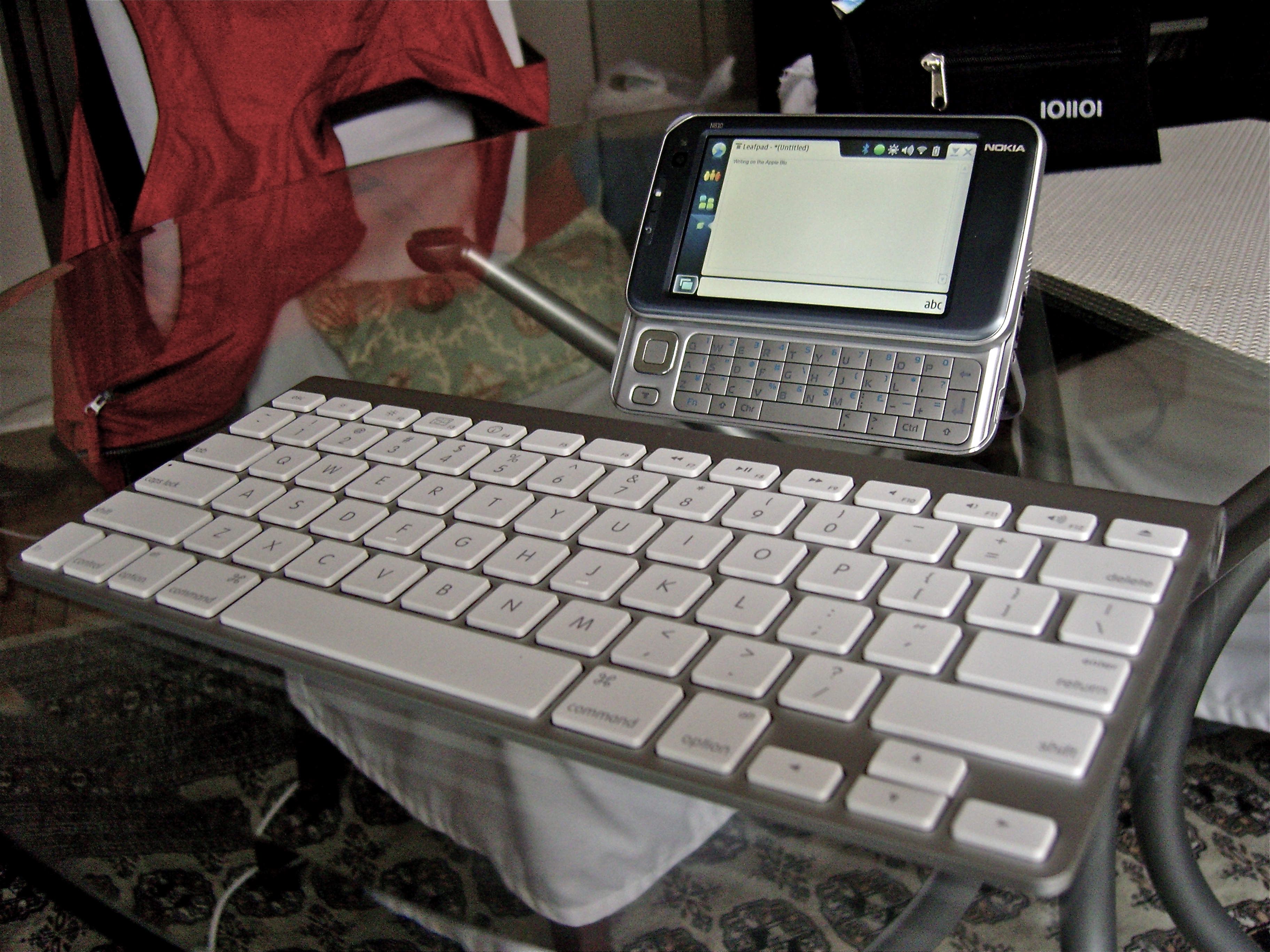
I have paired an Apple Bluetooth keyboard to it and it is now a very useful netbook replacement.

Media
It will play movies converted to mpegs or wmv’s. It comes with a one month trial of Rhapsody’s music library which is wonderful. I installed a Mini-SD card which had a few albums from my former Treo. With the iTune’s store offering DRM free MP3’s, getting music onto this device is not too cumbersome. The included headphones have a built in microphone for phone calls which work fine as well.

Rationale
Why did I get this when iPhone did most of the things I needed? It has to do with the things iPhone left out: Bluetooth keyboard, copy-paste, multitasking, and builtin-keyboard. I got the N810 through Amazon -not from the mothership but one of the vendors who had it for $250. With Apple Bluetooth keyboard which is very portable and stable, and usable with my other Apple gear, it is a worthy replacement for the Acer Aspire One which I recently sold to a friend.

Why? The netbook phenomena is a giant failure because it has been hijacked by Windows. With Windows XP, these small laptops are just that -small Windows XP laptops with slow processors. Coupled with Vista, these netbooks are completely useless. Microsoft intends on loading these netbooks with Windows 7 that has been downgraded to run only 3 applications.

Right now, I can compose on a very comfortable keyboard or a usable thumbboard in a pinch with a total cost of $325, with all the communcation capabilities brought by Nokia. Very happy. This entire blog entry has been created on the N810, by the way.
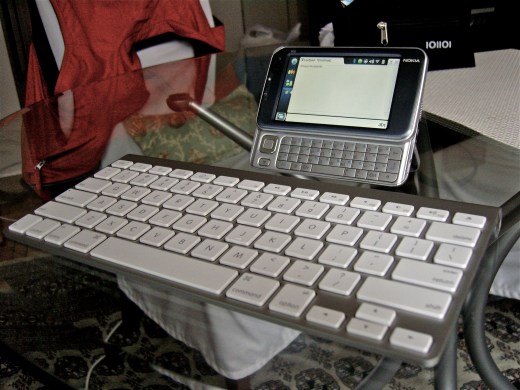
The netbook replacement in action

The netbook replacement in action

Rhapsody on the N810 is pretty cool because you have access to a large number of tracks and radio stations centered around bands. This rental of music scheme is okay, but I don’t think I’ll keep it. Pandora works! It’s slow, but it works fine. Streaming Sting radio, it comes through with FM quality with occasional very short skips probably related to the processor groaning while I type away.

The media player does a fine job with files loaded onto the internal storage. External storage is in the form of Mini-SD cards. I don’t particularly mind as I have all the adapters, but would have preferred regular SD. I don’t plan on watching movies with it, as the iPod is just too easy to use -iTunes to iPhone trumps ripping DVD’s to the correct aspect ratio, then copying to a mini-SD card -it was okay ten years ago to geek away, but in this day, streamlined delivery of content is a given.

I wish they would update the Flash, as Flash 9 doesn’t work on all sites, particularly Hulu. Also, Netflix is run off Silverlight -and I doubt they’ll release a Linux version anytime soon.

The picture shows the minikeyboard opened -this elevates the display perfectly. The easel stand is a wonderful touch. The Apple Bluetooth keyboard is the same chiclet keyboard found on the new Macbooks and is wonderful to type on. It would be great if iPhone would do the same, but we will never ever see this. They want you to buy a Macbook.

Addendum 3/23/2009
After using it as my netbook replacement for a week, I have been only delighted with it. I use the open source program WordPy to update this blog. Google Documents, though a big laggy when it comes to saving and opening, works just fine and is the office solution that this device didn’t come with. The great thing is that I am now typing on a great keyboard and extremely portable.

I have totally gotten into the internet radio, which for now eliminates my desire to pick up a short wave radio. Hundreds of stations from Hong Kong to Zambia, from Lichtenstein to Kuala Lumpur are available.

I also get much better phone calls out via Skype indoors at my hospital over the guest web connection than I do through the AT&T connection which goes through a repeater. I have to figure out how to get my contacts on the thing though -simply taking outlook contacts and trying to get the N810 to recognize them isn’t working.

Addendum 4/17/2009

After a month of use, I am pleased with the portability of the setup. I do find that certain things run slowly -some web pages take a while to load up where in iPhone Safari -it’s pretty blistering fast. Also, typing on some Web 2.0 pages causes strange stutters in the text. It is much easier to live with than the Acer Aspire One primarily because I didn’t need a small Windows XP laptop in my life. This the N810 does everything that iPhone doesn’t do at all very well. The overlapping functional items -mostly I leave to iPhone because I don’t have too much in the way of non-iTunes related media. The whole idea of using the Acer One as a large video iPod really failed because the video output was laggy compared to the sound.

The N810 is a device to fill in the gap between iPhone and a small laptop. It does this function very well.

My First Computer

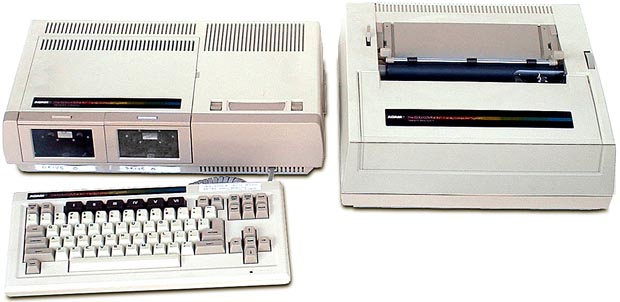
adamMy first computer was the Coleco Adam computer. It came in the winter of 1983 as a Christmas gift. I chose it over the Apple ][ and the Commodore 64 because this computer came with 80k of RAM based on a Zilog Z80-A processor running at 3.58MHz. It came with a daisy wheel printer which put out typewriter-like text, and had built in wordprocessing. 

I fancied myself a writer, and quickly began using it to churn out really bad science fiction, erotica, fantasy conversations with famous historical figures and chimpanzees, and long, simultaneously self pitying and self-aggrandizing essays about myself. Somehow, I have never broken out of this Kilgore Trout writing style.

I wrote my college essay on it -if I can find it, I will post it at some point. And, you could program on the BASIC language that came it it. I programmed LIFE (the computer problem, not the board game –link) but each generation took about 10 minutes, and I would have to let the thing run for days to reach a steady state. 

What was even better was that it was also a full blown Coleco gaming console, and you could play War Games which I did for many days on end fighting writer’s block. Buck Rogers came on the silly proprietary tapes that Coleco admittedly decided was a big mistake. 

In the end, I left it behind when I took off for college, like a sad younger girlfriend or a bad haircut. I moved up to a 512k Macintosh, but I still have a soft spot for the ADAM. Like everything in this navel gazing age, the uber geeks out there have actual conventions where they meet and commerce in this defunct, obscure relic from the 80’s. Some bright chap with too much time has actually got it to go on-line and act as a web server.

Spaceward Ho! -the greatest game not yet on iPhone


space-logo

This is one of the greatest games ever created for the MAC. It came out in the early nineties, and it was one of those games that just ate up time. It is a resource management/conquering worlds game that was reduced to its barest essentials, but managed to keep certain elements intact to keep it interesting. 


It is such an efficiently written game that in the early ’00’s, the authors, Delta Tao (link) published a Palm OS version, which I used to play on my Tungsten T during my first years out of 

space1

training -usually during the dead time waiting for cases to go in the middle of the night. 


Resource management games are very old in the scifi-nerd culture. The problem is that when presented as a board game, an inordinate amount of time is taken up book-keeping. How many Quatloo’s can you keep track of while rolling the dice and moving imaginary fleets across the board? 


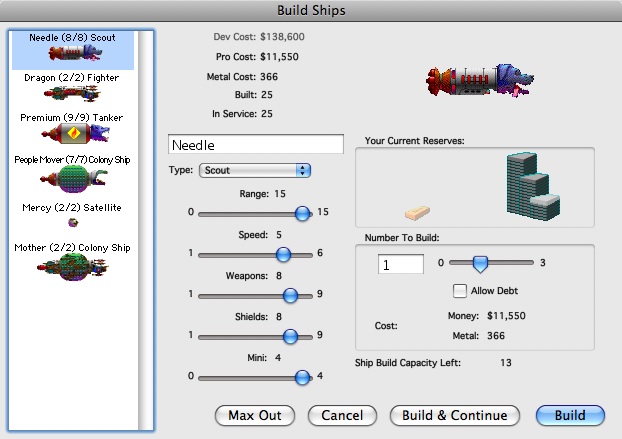
The game play is simple as clicking the keyboard. You start with a homeworld, and your mission is to explore and colonize surrounding worlds, mining the metal, and terraforming the planets so that your population grows on it and generates revenue. Terraforming, mining, designing and building ships takes money. Borrowing and saving also involves interest. space21


The game’s charms involve humorous graphics for the spaceships and funny sound effects for launching and exploring with the spaceships. The game quickly becomes interesting as you confront and battle against other players (both computer or human). 


It is turn based and requires a minimum of a learning curve. The shame of it is that Delta Tao has stopped developing it, right at the moment where farting applications are taking the world by storm. I can’t imagine it would take too much of an investment of time to convert it to an iPhone app. 

We can start by emailing Delta Tao to work on an iPhone version (help@deltatao.com). 

Addendum 2-24-2008

It works -Joe Williams -who the program icon is modeled after, replied “We’re talking about an iPhone version, and I’d say it’s highly likely, perhaps by the end of 2009.”

Will It Wash and Dry?

img_2010My iPod shuffle is so tiny it gets lost in my clothing. As such, it gets frequently washed and dried. The remarkable thing is that it still works! The same goes for my V-Moda headphones which after snc10296a spin cycle and drying, it came out in a tangle. Still works! I realized that so many things electronic are spindly and delicate that we’re used to taking care of them with the anxiety reserved for the moments watching someone juggle fine crystal, china, or your loved ones. It makes me quite happy to know that some things do take a licking and keep on ticking. Which is exactly what my Timex watch did after its stint in the wash and dry. Would be curious to find out other people’s experience laundering fine electronics.

The protonetbook

519yhcvvj3l_sl500_aa280_

Pictured above is the Psion Series 5mx. It was an upgrade of the original Psion Series 5, and no computing gadget has come close to matching its utility.

It had a touch typable keyboard and compact flash drive for additional memory. Its power laid in an amazing operating system EPOC OS that Psion built from scratch. It was rock stable -the kind of stable that you would hope satellites and medical life support equipment were based on. I could routinely run 10-20 programs simultaneously and it just would not crash. The Office suite fit in a space less than a meg of memory -I heard the word module was 22kB!. The elements from each -like graphs, tables, and text were hot linked and autoupdating. And you could convert it to word or rtf or xls.

It ran on 2 AA batteries and could print wireless via IR to HP printers with IR ports -I did this for three years during my residency -eventually creating a database of patient notes that I could look up and reprint for frequently seen patients.

When you wanted to use it, you turned it on. When you were done, you turned it off. No boot up, no worrying about viruses, no nothing. With a phone modem, you could check email and do some light browsing, particularly on WAP sites (the equivalent of todays mobile sites such as m.nytimes.com.

This all came to a sad end when Psion gave up the ghost after creating the inimitable netbook, for which it carries the copyright. Nobody can call anything else a netbook, although common usage is calling a whole class of crappy small laptops.

Why do I call them that. No matter how beautiful the gadget -like the Sony Vaio P series, it’s software determines how useful it is. If you got a Sony Vaio P, for example, you would turn it on, and wait 47 seconds while it booted up. What’s the point except to impress people with your stupid gadget purchase?

The Psion 5mx is so valued that you can still see them on ebay going for 150-200 dollars used. There is a site in England that will sell you pre-owned refurbished units or even NEW units (link). It is illustrative that a the netbook Pro, an “upgrade” that runs Windows CE 4.2 is priced way cheaper than a refurbished netbook running EPOC OS. 

As I have been unhappy with my iPhone as the sole portable device, I have been thinking about keyboarded solutions for blogging. The lack of wireless internet capability of the series 5mx keeps me from purchasing, as I have an Acer Aspire One which I use as a breakfast nook computer for updating Facebook. I am toying with the idea of a Nokia N810 with a bluetooth keyboard as a mobile blogging solution. 

If you needed to go to the unwired parts of the world with no wall outlets, but needed to write a journal of your journey, there is no gadget that I would take other than a Psion 5mx. This was exactly the reason why the fellow who purchased my Psion in Mexico bought it -he was a writer who made frequent trips to rural Mexico and needed a solid portable computer which recorded to a safe medium -nothing more safe than compact flash drive which I have laundered and used without a hitch. AA batteries can be found everywhere but wall outlets are dear, he told me, paying 250 dollars for a five year old unit with printer cables, modem, and other accessories.

The Entertainer

img_1720This is a 17 inch Dell behemoth that weights about ten pounds and is useful for checking email. It also offers connection to Youtube, Hulu, iTunes, and Netflix, and offers more entertainment than my 42 inch DLP TV in the basement with a DirecTV HD account. On screen is the 2-3pm episode from the current season of 24. 


Broadcast television was supplanted by cable. Cable television and its prettier sister, satellite television, are headed for the attic of dead technology by video on demand over the internet. This was presaged by TIVO and the ability to time-shift programs. But Youtube and Hulu, iTunes, and Netflix, and shows available on the networks sites all presage a time when you don’t have to watch what is available, but rather you choose exactly when and where to watch what you want. 

Currently, with the offerings of Youtube, Hulu, iTunes, and Netflix, I canimg_1721 watch pretty much whatever I want whenever I want. If a program isn’t available in fact, I usually couldn’t care less. This is an important threshold -if something of critical value weren’t available -I would feel compelled to pay extra for it. This one quality that is keeping the satellite subscription alive is high definition programming. It is just valuable enough to keep it around for the sake of viewing on a large screen, but the fact of the matter is that a 50 inch widescreen TV at 10 feet is the same as watching a 10 inch screen at 2 feet (yes, I did the math -proof above). That means, streaming hi-definition images to a 10 inch netbook gives you the same images relative size as watching a 50 inch screen from a couch. 

We are about to cancel our DirecTV connection in favor of our home stable of laptops and iPod touches. The video time that we have as a family is spent in bed with a laptop watching one of 12,000 movies available over the ‘net on Netflix with a $10/month account, or downloaded to an iPod for 1.99/episode, or on DVD, again on a laptop. The large screen is okay for viewing sports, but time is short, and the networks are available over the airwaves in HD. Fact is, I prefer watching sports with other people at a sports bar. 

The purchase I am considering next is a small computer capable of streaming Netflix and running iTunes, with double duty as a email checking station. The cable company gets to stay in the house only for the internet -until fiberoptic broadband becomes available then goodbye cable. In fact, I am waiting to see what Apple does with AppleTV versus the Mac Mini.

What I discovered more recently is this: it is more fun to make TV than it is to watch it. Check out my friend Victor’s channel on Youtube (link). 

The TV is dead. It is now just a monitor.