The Doodler

I have been blissing with the iPhone app Brushes. I like to draw and doodle but actual painting is a pain because I have to set aside time and get messy.

Painting puts me in a calm state that is similar to the zen golfist moments. Brushes solves a lot of the problems with computer art programs by being limited and unrealistic. Unless you buy expensive software and invest in a tablet, your stuck with the basic paint programs that haven’t evolved since MacPaint.

Brushes is powerful enough that works created on it have graced the cover of The New Yorker. Now I can work on my Self Love series in the convenience of an airplane lounge, the bed, and the commode with no messy paints to clean up.

Golfshot GPS-a new program to rival View Ti Golf? -mini-blog update

IMG_0252While playing in the recent HAC, my good friend JN showed me his new iPhone 3GS which was pretty cool. What was even cooler was his golf round management system. It is an iPhone app called Golfshot which in terms of design and features matches up and exceeds View Ti on many counts. He showed me how each shot can be stored for statistical analysis, how yardages to different spots on the fairway can be graphically demonstrated along with distances for the next shot.

I downloaded the app and was immediately disappointed to see that Wakonda hadn’t been loaded. I went to their website (link), and requested the course. This requires taking a picture of your scorecard and emailing it to them, or as I did, scanning it and emailing it. The process is described on the website as requiring a week to map a new course, but to my pleasant surprise, I got an email within 24 hours that my course was now available.

What’s great was that all the tees were available -except for black which are the tips. I’ve emailed the support team. As with View Ti, I will post this review as a mini-blog -and I have a free weekend coming up!

August 1, 2009

Playing at Wakonda, I found it to be of limited utility as I make it a practice to know my own course. For this reason, View Ti Golf is rarely turned on as well. Yesterday, I was invited to play with WW at DMGCC, and this was the moment I was waiting for to try Golfshot -playing on a new or rarely played course. I also tried out the scoring and stats function.

The GPS accuracy is not too bad -no different from View Ti Golf. The one convenience is the little GPS status icon which goes from red (seeking) to green (satellite captured). With it green, it takes anywhere from 5-10 seconds to settle on a read, and it is very close to the pacing off fixed markers on the course.

IMG_0317

WW lines up his drive

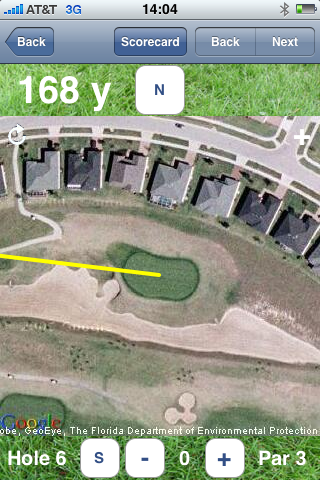
On the tee -facing a blind shot over four bunkers, I really had no idea where or how far I needed to hit. The picture is to the right -the green was about twenty feet below on a dogleg right. It looked like I needed at least 200 to clear the bunkers, and a safe bailout to the left would probably leave me far away from the hole. Golfshot trumps View Ti in its graphics and interface particularly for planning approaches. I brought up the aerial view and moved the target bead to various trajectories over the bunker (below).

IMG_0316

Carrying the drive over the second bunker 250 yards would set me up very nicely. I aimed over the rightmost bunker and set up my draw which had been behaving most of the front nine and I clocked the drive and ended up on the left fairway about a 100 yards from the pin, setting up sand wedge approach from a downhill lie which i placed 10 feet from the pin. Unfortunately, I two putted for a par. The greens at DMGCC are all tricked out because the property is build on cornfields and feature false fronts and anatomically correct curvatures, apertures, nooks, and crannies.

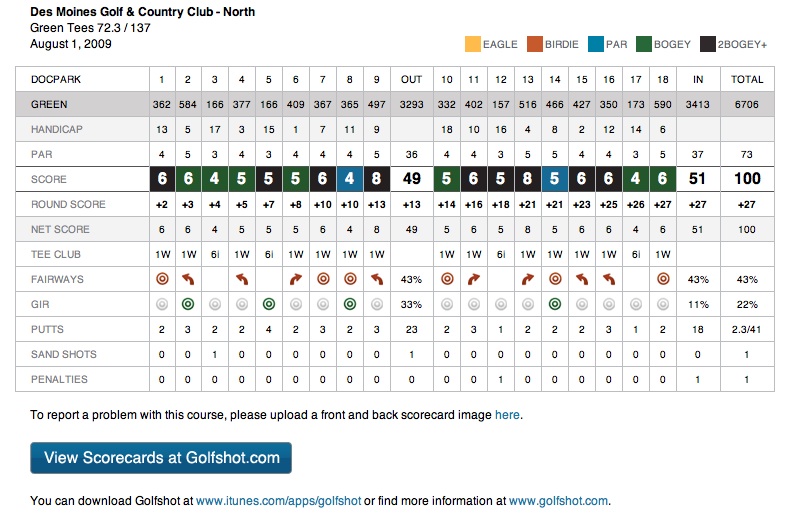
The scorecard function works very nicely -I didn’t notice you can also log your tee off club, but the stats don’t lie -my drives worked well when I was controlling a mild draw, but failed when I blocked out and faded -a disaster when you’re set up for a draw. Also, some of the greens gave me fits and 3 and 4 putts put the nail in my coffin.

scorecardI was very impressed that finalizing the score resulted in an email of the scorecard to my inbox. One notable difference from View Ti is the GIR is autocalculated -if you two putt for a par, it is assumed you hit the green in regulation. It takes about 3 to 4 clicks to put in your scores and stats which is a real step up from View Ti Golf with their really awful X’s and O’s which only a professional caddy would love.

Other features, which I will expound on in later entries, include the distance of last shot feature -works okay but not if your call is interrupted by a phone call or if you leave the program to check email -not the programs fault but the way the iPhone OS is set up -something that they have to address in their next tablet, and listing of yardages to hazards and important landmarks -very useful.

In comparison to View Ti Golf, this program is very well thought out and clearly not a flurry of hurried addons and upgrades which View Ti Golf has been suffering from. I think View Ti Golf was the early leader, but Golfshot GPS trumps them in interface, utility tee to green, and in statistics which weren’t too difficult to track.

That being said, I do have to say that View Ti N’s no nonsense yardage to hole only feature at rock bottom pricing offers a cheap, functional alternative to both View Ti Golf and Golfshot GPS.

The only shoutout I have to both software houses is why with all the fancy GPS do I have to select the course that I am on. When I am on the first tee of DMGCC’s North Course, the iPhone has that information, but I still have to wait and get the list of “nearby courses” and then select the correct course. Also, the scores should be dumping into the USGA handicapping database along with course, slope, and handicap.

I like Golfshot GPS a lot. I think View Ti folks will have to seriously hunker down and change the way they record their courses to bring on the features that Golfshot GPS pwns even as they revamp the interface -a lot of geek work which will take about 6 months to a year.

August 11, 2009

Golfshot GPS proved its worth on this blind shot. number6 approachIt’s on number 6 at Wakonda, a longish par 4 made longer by moguls. The drive which nice and long set me in the valley behind a hill beyond which is another valley that collects approaches that are short of an elevated two tiered green. When the pin is on the left, upper tier, you have a 10 foot strip to land on or end up on deep rough to the left or on the lower tier to the right -both pretty much means double bogey is a good score. This tree blocked any high approaches and I needed to cut a medium length iron starting to the left, having the wind lift the ball and land it softly on the upper tier, but which club? The nearest marker was far away, and this is where Golfshot shined. After locating the pin from top of the hill, I was able to get a distance to all the possible hazards. IMG_0343This let me choose an 8 iron which when I open the blade goes about 133. I reckoned the pin to be about level with the ball. I hid a hard fading shot that avoided the limb but the wind didn’t cooperate and the shot went long and slightly left of my intended target. Being in the rough to the right meant a very delicate chip. It took me five more strokes to finish out the hole with a triple bogey. The club selection was correct, but the left to right wind in the face was not there.

The real strength of Golfshot GPS is in the scoring and stats department. It runs beautifully and well on my second generation iPhone. At the end of the round, I emailed myself the card for later analysis.

scorecardThis round revealed the problem that I need to address going into this weekend’s HAC tournament. My driving is very much off -I hit only 35% of fairways, and this resulted in a lot of needless scrambling. As I was playing by myself, I took unnecessary risks and mostly they did not pay off -I will decrease the risk reward spread by keeping triple bogey off my scorecard this weekend. I made 5 triple bogeys and three double bogeys -if they were merely bogeys, I would have shot 83. My short game was streaky. I have been working on chipping and putting and it has paid off in the two birdies I had -it’s been a while since I had two birds in one round.

Golfshot lets me identify my problem -that is my driver has to not duck hook and I have to work harder on my mid-irons. My putting has to be less aggressive in spots where bogey is better than double, and double is better than triple.

I’m really beginning to like this program primarily for the scoring.

Addendum: 8/16/2009

I used the program at Waveland yesterday during the HAC. The scorecard from that is in my HAC 2009 entry. There was a hole where the program really showed its usefulness. I sighted a blind uphill 165 yardish approach with both the yardage and trajectory to the trees behind the green which I could see from where I was. I squared up a 5-iron, put my shoulders in line with the slope of the hill, lined up on the tree that Golfshot predicted, and swung away after a final exhale. The shot which I did not see land, was reported to have landed in the front of the fringe and rolled up to 8 feet from the cup. I put this putt in for birdie.

The stats function is by far the coolest feature of Golfshot which works well with the flow of a round of golf, much better than View Ti, and the layout and graphics of the emailed scorecard speaks for itself. GPS on iPhone and basically in the US is only so-so accurate and it takes about 10-15 seconds to get a lock.

Battery usage wasn’t terrible -this while I was skimming the PGA tournament. BTW, it was a great weekend for golfers of Korean extraction. I got down to red by the end of the round, but never worried it would blinker out.

Addendum 8/19/2009

Played around with the stats segment. IMG_0424It goes to a mobile Safari link that shows you your stats broken down by major category and over 5 or 20 occurrences. For example, my driving accuracy is pretty mediocre at 36%. I miss more the the left (draw) than the right (blocked out). There is also GIR, Putting average, Recovery Performance, Scores by Par, and Scoring. I am happy to report I am averaging 1.9 putts per hole which has been my goal since beginning of summer. Scores by par tells me that I play bogey on par 3’s and 5’s, but tend to play slightly over bogey on par 4’s.

This is all very nicely presented in a tidy fashion. Golfshot keeps your database available over the web and on the iPhone -nice.

Colorsplash -very cool iPhone photo app

IMG_0250This picture was taken with my Samsung NV10 on macro settings, but was placed in my iPhone library as I sync some of the iPhoto folders. The original is here below:


SNC10218
Using the iPhone app, Colorsplash, I was able to bleed out the color from the background leaving only the subject in natural color. Doing this took about 2 minutes of zooming and swiping away the color, basically the same amount of time as on a laptop with Photoshop. The reason why its better on iPhone is because the touch interface is made for this kind of photo processing. It joins a trayful of iPhone camera/photo apps which I find indispensible. Available currently for a 1.99 on App Store.

The iPhone Does Everything – REVIEW of View Ti N and View Ti Golf -UPDATED AFTER USE

screen001

Addendum 5-23-2009: contest for a download of View Ti Golf –link here

Preview -authored 12-2008

With the iPhone and App Store, every day is like Christmas. I had held off buying a Sky Caddy this year, because after purchasing the iPhone 3G, the first thing I noticed was when I GPS’d myself on Google Maps while playing at Hyperion, my exact spot on that hole showed up on the satellite view. I mentioned it to DH, and pointed out that if I could send a caliper to my target on the map, it would give me yardage readings. Why get a Sky Caddy?

img_0009

Well, the wait wasn’t too long -it seems every nook and cranny of a target iPhone owner’s needs are being met almost on a daily basis. I don’t go more than two or three days before perusing the App Store for the next great thing. But it was actually YH who recommended View Ti while we were out in NY. I downloaded the free Lite version to see if it had any Iowa courses on it -well it didn’t and I let it sit for a while. The closest listed course was over 80 miles away.

Couple of days ago, I went to the app’s website, and saw that you can email course requests. I zipped over requests for Wakonda and several other courses I scoot around on, and lo and behold, at 4 in the morning, I get an email telling me that all the courses were on.img_00111

When you pick the course, you are immediately given your GPS distance to the middle of the first green. Picking Wakonda, you get a setup screen for your game -it keeps your score as well! You then go to the yardage screen and you get a satellite view of the hole and your yardage -which from the my home office is around 18,924 yards! That would be about 90 perfectly hit hybrid-3’s as the bird flies.

This is impressive, and the paid version is 12.99 which is a significant discount from it’s previous price of around 20. Compared to a Sky Caddy -fuhgeddaboudit. Amazon lists various flavors at 150-300 bucks. It would be another golf gadget to get lost in my bag.

I am thoroughly impressed and look forward to actually using the program. I just purchased the full version while writing this preview.

Addendum: 2/2/2009:

I have noticed my 12.99 View Ti did not have the Google Maps images, but rather a simple display of yardage only . After some investigating, I have found that the 12.99 is for the basic version, with a View Ti G offering the Google Maps for a 39.99 fee. I will see if there is an upgrade path (with paying just the differential). Frankly, I don’t think that it’s a dealbreaker, because I know my course. The accuracy is claimed to be on par with SkyCaddie. It is still 20 degrees here in Iowa, so I haven’t had a chance to spin it up, but will report as soon as I use it.

Addendum: 2/21/2009

I tried both View Ti N and View Ti Golf. I am visiting my folks in Orlando, Florida, and it was easy to get their home course up (Sanctuary Ridge) from the GPS. img_0908The course is unusual for a Florida course in that it has challenging topography. None of it was created for the sake of undulations, but rather, the sloping hills of former orange groves have been carved into a very nice layout. The subdivision was one of the last built by Levitt and Sons before they went belly up -an early casualty of the current crisis.

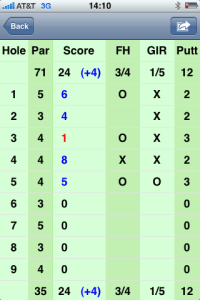
img_0020The score keeper function works nicely except for a bug I noticed in going back to a hole to edit the score -the previous score tends to persist until you go back and change it a couple of times.

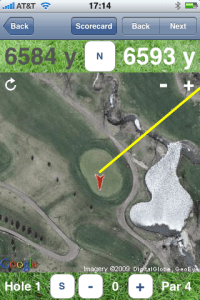
The personal scoring feature is seen in both the cheaper N version as in the Golf version. The star feature of the Golf version, which brings out the green for the approach shot and allows you to move a red cursor to the pin position worked fine, but I have one complaint. The satellite images that were used for this course came from an old satellite set that shows the greens and fairways when they were under contruction.

Don’t expect real time satellite views -it’s expecting too much. The other annoying thing which I think is a deal breaker for me and makes me wish I didn’t pay the full 49 bucks (only hours before it became available today for 24.99), is that it takes time to download the images and orient them on the screen -takes up a crucial 5-10 seconds which I don’t want to use fiddling. This is where the View Ti N works just fine.

View Ti N has advantage in that the image of the green does not have to be downloaded and you are limited by GPS satellite fixation -takes about 2-5 seconds.

takes about 5 seconds, and are outdated images

takes about 5 seconds, and are outdated images

As for scoring a foursome, it just does not beat the utility and legal formality of a scorecard and a pencil. I think the utility is personal -in being able to track Fairways, Greens in Regulation, and Putts. This is something I do with a scorecard and View Ti N (and Golf) do this well.

Verdict -wish I had this info before pouring 49.99 into View Ti Golf. The N gives you exactly what you need -the distance to the center of the green and the personal golf score function. Scoring for 4 on the iPhone is just a set up for grief and I would avoid it unless it can talk to other iPhones with View Ti Golf.

One more thing – starting with a 75% charge – the phone quickly drained it’s battery. It was redline by the 9th hole granted I was clicking pictures, but the heavy GPS and 3G usage shpwed Having used it only once I can’t say it’s a feature isolated to the Golf version.

An Aussie reader commented that his course was not available -would be very interested in an update.

Addendum 3-8-2009:
View Ti isn’t working in Houston. For the two courses I played yesterday (Houston National and Blackhorse), the yardages were off by 10-20 yards, which coincides with the minimal survivable radius for a mortar round while keeping your blue dot on track in Google maps. I wonder if GPS is detuned in Houston.

Addendum 3-11-2009

Have given the inaccuracy issue in Houston some thought -It was about 10 yards off at Redstone, site of the Shell Houston Open. I think it could because of two things -first -View Ti just upgraded after I got back for “GPS issues.” The other thing I read online is that the location function on iPhone uses a combination of GPS and cell tower triangulation, and when 3G is active, it pushes the accuracy off kilter. I haven’t tried it yet, but I will be on some courses soon -but the gist is that 3G should be turned off for accurate GPS. Who knew?

Addendum 3-17-2009

Having tried it at Montauk Downs on Long Island, I found View Ti N -which I used to avoid lags, to be accurate within to visual estimates and to the fixed yardages on the course. This has been since I updated for the “GPS” issues. I do find that getting a GPS fix takes about 10 seconds, so you should get in the habit of turning it on on the tee.

Addendum 3-22-2009

There has been an update to both View Ti N and Golf -described as a rollback to improve GPS accuracy. I will be trying these out at local courses this week. I wonder if this was at the heart of the readings being about 10 yards off in Houston?img_00011
Addendum 3-24-2009

I requested an odd little 9 hole “farm course” that is common here in Iowa. Small municipalities each have a 9-holer that is tucked away and easily accessible. It is also pretty cheap -with basic 9 hole greens fees running 14 dollars. As a test of strength, I requested the course on iPhone by simply pressing the course request button -it brings up an email addressed to the support people -I specified the course name, Sugar Creek, and locale -Waukee, IA. Didn’t say anything about it being just 9 holes. It took 48 hours -a day longer than a previous attempt, but they successfully loaded it in the correct hole order -I don’t know how they manage this magic as this particular course runs all over the place as the cow meanders. Kudos to the View Ti people. My home course is opening the putting greens this weekend!

Addendum 4-4-2009

In Florida, at Sanctuary Ridge, looking at a par 3, scrnshotthe View Ti Golf is telling me 127 yards (see screenshot to the left), but the tee is two yards in front of a stone marker (inset left) saying it was 133 yards -assuming center of green. The flag was red, and on the front margin, so it was less by a bit, but the discrepancy was annoying. The green as we drove up is shown below.

The question was, do I hit a hard wedge or a soft 9 iron. With the wind at my face, I chose a regularly swing 9 iron with the ball slightly teed up to take a bit of distance off -I was calculating about 124 yards.

I was pin high, but fact is, I think the discrepancy has two sources -the builders may have placed the marker and things may have moved in the 5 years (ie margins of green therefore center of green), or the mappers at View Ti when planting the hold in the visual center of the green are subject to an error of around 1-2 yards. I think the GPS is also subject to a 1-3 yard margin of error.

img_0070This 5 yard variance is a half a club for me. That being said, I was okay with my decision to use the 9 iron. On approach, the distance was not too back, and I rely on my visualization of the flag.

The score keeping function was nice, but I don’t like recording a Fairway reached as a Zero rather than an X. This was confusing at first, as I would have thought a missed fairway was a Zero, and a fairway reached was X. Even specifying yes/no would be better. Also, I reached both par 5’s in two -is that a green in regulation or not? I think not. A GIR with three put should be a bogey, but a green reached in two with three putt is a par.

My score card shown below, was easy to track, and provided very useful statistics. Primarily, if I managed to avoid 3 putting the GIR’s and par fives reached in two, I would have shot a very nice 38! img_00041Addendum 4-5-2009

Wish List:

1. ability to forward your score to the USGA for handicapping -the course’s slope and handicap would be included meaning no fuss for the reporting person. You just have to input your USGA number into the preferences.

2. if you can email the above scorecard as a jpg or pdf, or format as a .csv file.

3. set up a database at View Ti for scores.

4. make buttons for scoring bigger and more visible -there has to be a way to keep shots, fairways, GIR, and putts on the same screen.

5. Turn the O’s into “yes” and X into “no’s” as an option.

6. add option for tracking 150 yards in and up and downs

7. long drive -be able to establish the location of the tee box then press a button to get driving distance -how cool is that?
img_0087Addendum 4-14-2009

The courses around here have opened up, every one except for mine which underwent a major facelift last year. The practice facilities have opened, and so I’ve been practicing my putting stroke -it’s not as easy as it used to be when I was a kid and everything was by feel and really good vision.

Not using View Ti, but using the Masters app, I think there is space for golf instruction apps that combine video, diagrams, and text -I’m not talking swing coach stuff, but rather things like putting drills and alignment drills and course management tips -especially after an analysis of the scorecard above (Would you like some putting tips?). I really like the Golf Tips with Joe Beck, but they stopped updating in 2008. They were short, simple, and effective. The Masters app proved that you can stream high quality video over 3G.

The real test for View Ti will be this weekend -I’m going to play on a course that has radiotelemetry location with a computer on the cart that gives you yardage. It’s very good and calibrated well to the course markings. We’ll see how View Ti matches up!

Addendum 4/17/2009: Faith

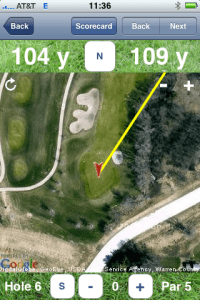
I am titling this addendum, Faith, because today, putting View Ti Golf head to head against Legacy’s radiofrequency triangulation units on their golf carts, View Ti did better -this is in comparison to actual course yardage markers, and to results. For example, img_0014the View Ti Golf image on the right shows the distance at 109 yards. The cart computer told me it was 118 yards to the pin. It was an elevated green, and this was a difference between a 9 iron and a PW. I have had growing faith in View Ti even over calculcated distances from actual physical yardage markers -eyeballing the 100 yard mark, I could see that it was about 120 yards correlating with the computer. I chose PW and got the result below:

img_0148

The ball to the right is mine which I had left for par…which I missed.

That being said, you have to give it about 10 seconds to get a good satellite fix, you have to use your eyes adjust the red triangle accordingly, and if its your home course, you have to know the yardages and pin locations better. I think the pins had been moved without recalibrating on the cart computer because of the way the physical marker jibed with the cart to center of green. Or I just had a lucky shot.

I think not, because it gave correct calls on clubbing far more often than the golf cart computer.

I found a glitch -if you roll over to next hole while scoring after the 18th hole, the scorecard rolls over to hole #1, and it changes the score to 1. If you press next hole -you then turn the #2 score into 1. The solution, after some frustration, involves fixing #1, then going back to #18. There should be a “finalize scorecard” or “sign scorecard” button that lets you end the round.

Addendum 4/22/2009

I went to the local track, Waveland, and got teamed up with two fine golfers -Rob, a regular, and Tyler, traveling on business. Rob looks to be a solid 15 handicapper who can shoot low, and Tyler used to play college golf, but laid up his sticks for 3 years. Rob was steady, two or three on, always two putting. Tyler could hit the ball 300 yards on the fly, and it was wondrous to see -only he also hit a lot of trouble for his feats of strength. He made up for it with up and down power which is the more desirable ability.

img_00022View Ti Golf just was not

img_0149

working! It crashed on boot, and this was annoying as I wanted to use the putt counter. I switched to View Ti N -it has no deep stats, but has green view (didn’t know!). I was having a horrible time pitching, chipping, but putting was on -made several 5-10 footers, and even drained a 15 footer on the 9th and last hole! I realized the range finding function has to be given time -at least 10 seconds, and the admonition about turning iPhone on as you walk up to the ball is a true thing. For example, the yardage marker pictured showed 175 to center.

View Ti N initially showed 188, but slowly, and I mean slowly, counted down to 176 yards. Good thing, because the group ahead was playing circle jerk.

img_01501

The paced out yardage was 188, and View Ti N reported this truly. I chose to fade a hybrid 3, aimed slightly left of center, and made an effortless swing -got the result below. About 15 feet away. View Ti N will give you as good a yardage as Sky Caddy for a fraction of the cost.

img_0152The upshot is that you have to turn the iPhone on as you approach the ball. It has to have a good clean 10-15 seconds -which can be an eternity if you’re not prepared or if you aren’t following the donkey and the three wise men.

After I got home, I couldn’t help notice that View Ti Golf had an update on the iTunes. They really, really have to consolidate their choices to ONE GREAT APP.

Update 4-25-2009

View Ti Golf is not working despite the update -it tries to startup then crashes back to the apps screen. View Ti N works fine -again, YH’s comments about turning it on and keeping it on while walking up to the ball (10 seconds on) gets it a good GPS fix. Good enough for allowing me to choose 4H over 3H at 177 yards to an elevated green. Results below:img_0160

Addendum 5-23-2009: contest for a download of View Ti Golf –link here

UPDATE 7-20-2009

I have downloaded Golfshot (review here) which is a new golf GPS app for iPhone. It certainly looks more polished than the trusty View Ti -I will review. Their course loading process takes a week and requires sending them a scan of the scorecard -which may mean more richness of course info. Wakonda and several other courses are not on so won’t be able to tell for now.

Comparing View Ti to a commercial handheld GPS -GolfCaddy- on four separate measurements this weekent, got the same reading!


The Kindle 2 Price Drop

SNC10275

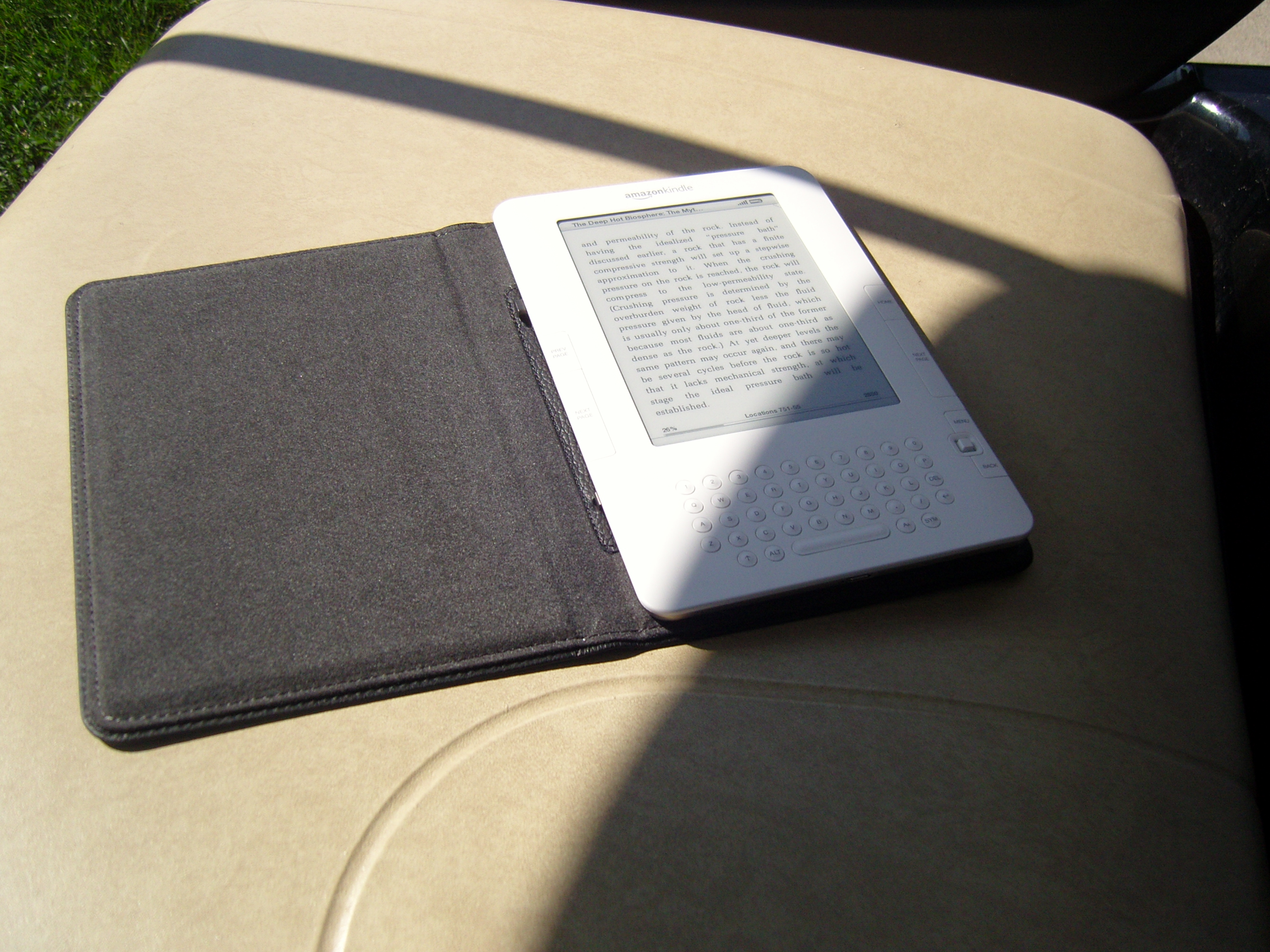
Screen needs light to be viewed, but really approximates ink on paper

There have been many reviews of the Kindle 2, and I won’t repeat these. I had been on the brink of getting one, but was enjoying my Kindle iPhone application immensely. What pushed me into purchasing one was the recent price drop on the Kindle 2 combined with my increasing frustration with my inability to purchase Kindle books from Amazon on my iPhone without going into the full web page on Safari (and not via their wonderful Kindle app nor their very workable Amazon Store app).

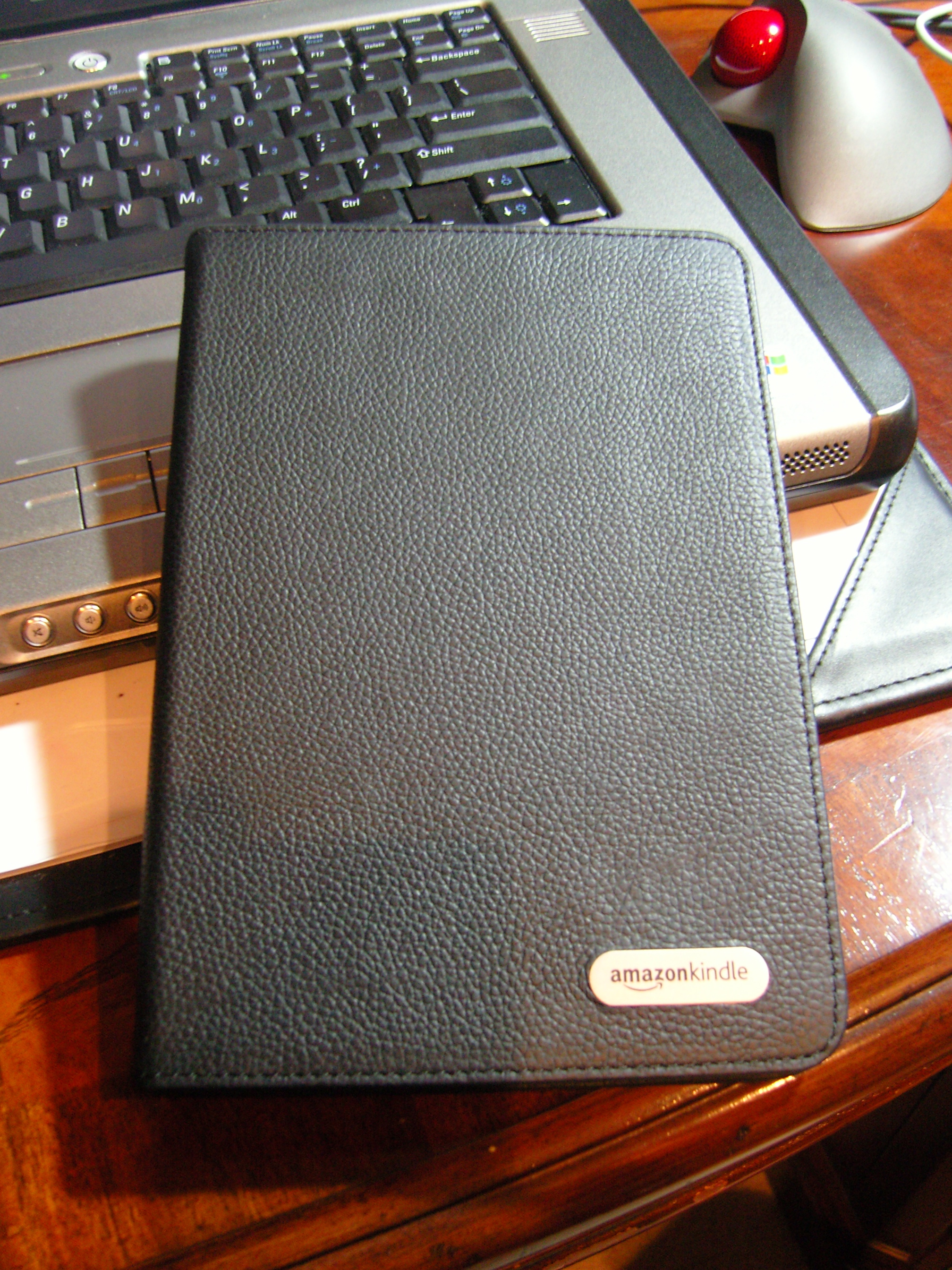
I ordered mine with the leather cover which gives it the hand feel of a nice 100 page leather bound book. SNC10278The screen is incredibly readable and trumps the reading experience on iPhone. The only advantage iPhone has is that you can read your books in bed with the light out. Your progress on the book is updated for both iPhone and Kindle.

Reading on Kindle is a joy -the device, though not pretty in the way that Sony’s E-Reader is, is solid and very thin and basically unobtrusive. It’s always on Sprint data connection included in the price of the Kindle means you can buy books anywhere which I did from the golf course yesterday while waiting for people to process their golf (Wakonda had one of its interminable outings). If you are especially cruel, you can go to Barnes and Nobles, paw at a book that you might like, look it up and see if it’s available (currently 300k titles), and buy it electronically and put the real book back on the shelf.

Not carrying a hardback book is a nice convenience. Not carrying many, many books is miraculous. Particularly textbooks which when searching vascular comes back with about 74 text books, discounted for electronic format. The problem with textbooks is that you can’t carry one around for reference or just plain reading for pleasure (I know, I’m a huge geek but that is why I got a Kindle).

Is it something that everyone should get -yes if you buy a lot of books and believe that scholarship is a lifelong avocation. You can get just as much out of a library card, but you’ll have to carry physical books. You’ll likely pooh-pooh it if you’re in that “I love to fondle books” crowd, but more likely than not, you have never actually seen a Kindle.

I think this is the killer app that will make Amazon the iTunes store for books. The question is, will Amazon open up the Kindle to kindlish apps, including an MP3 player app for their very nice music department (cheaper than iTunes).

Second Life for a Dead Windows Computer

SNC10172

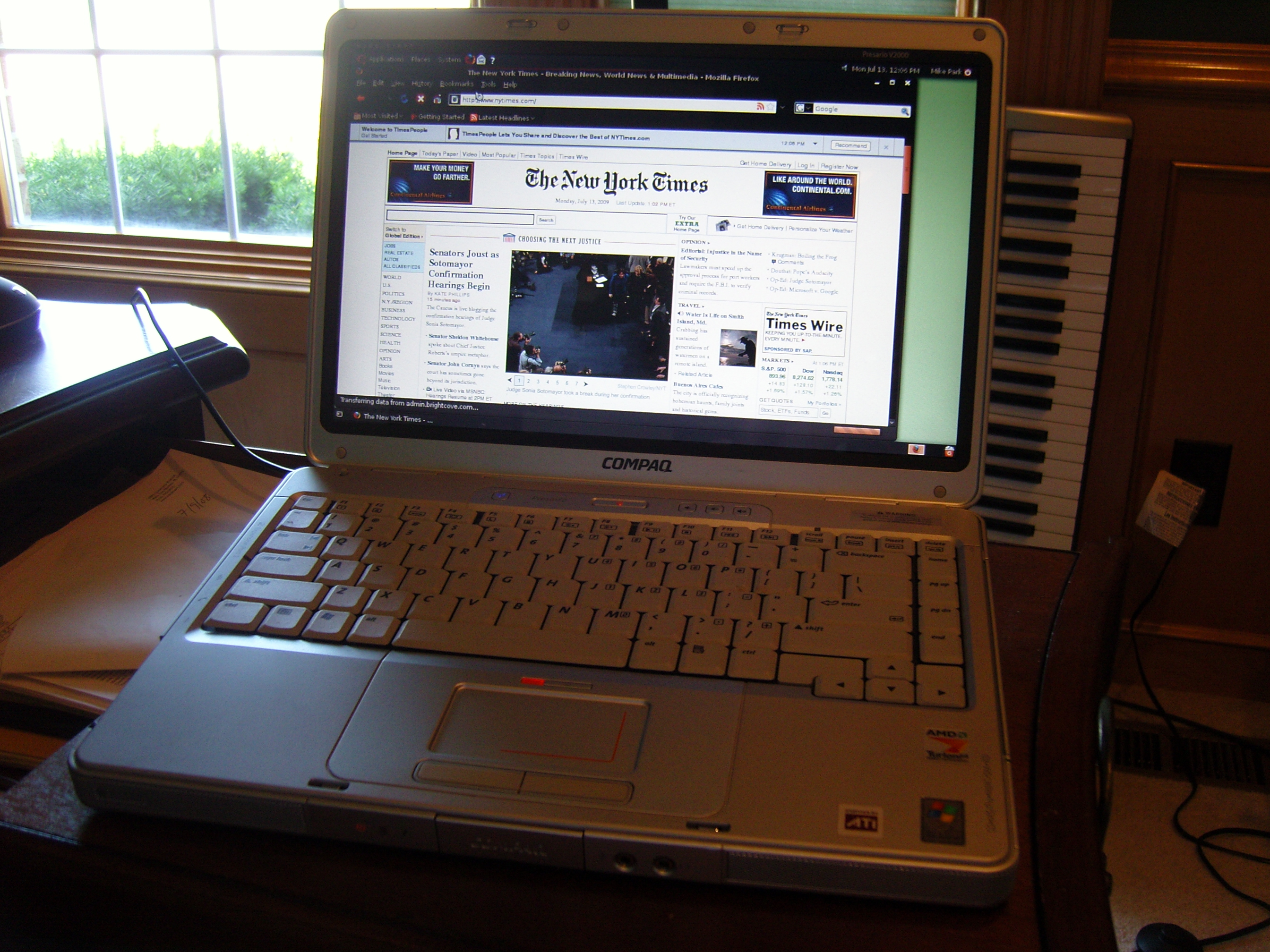
It was during last years journey from Florida to Iowa via a rented Tour Bus that my mother’s laptop finally died. It was a Compaq Presario V2000 sporting an AMD Turion64 bit processor. It came out in 2006 and had all the bells and whistles at that time -flash card slots, WIFI, DVD burner, and a very nice widescreen LCD. Unfortunately, it ran Windows XP, and my parents who are seniors, just couldn’t deal with all the requests for upgrades and found the virus protection difficult to manage. After a year in their house, the computer which ran well at purchase, was gummed up with spyware and took over 5 minutes to boot up.

When I looked at it, I realized the hard drive had failed -possibly from spinning continuously when the computer was on. As I had a replacement 40g hard drive that I had salvaged from a Sony Vaio that just died within a month past warranty, I swapped it out and reloaded Windows and all the drivers from the rescue disks I purchased from the HP support site. This was quite painful, but after I got everything reloaded, the computer ran, albeit sluggishly. I was about to give it back to my mother when suddenly it began to give me the blue screen of death (BSOD).

I looked into the problem and soon found that this particular computer, having a 64 bit processor, required drivers that were compatible only with Windows Service Pack 2 -when updated to Service Pack 3, it crashed. I scrubbed the hard drive and did a complete new install and switched off the update function. Strangely, Windows kept nagging me to update to Service Pack 3, and I couldn’t keep the requests from popping up. Finally, Windows upgraded itself without asking (I think I had stepped away and not turned down a request for an upgrade). This rendered the computer unusable again.

I decided to take Windows off and convert the laptop to Linux. I researched it a bit, and found that Ubuntu plays nice with a wide variety of laptops and I downloaded the OS Install to a DVD on my trusty Macbook Pro. Loading the OS was pretty straightforward. Getting the WIFI to work was a little tricky until I figured out how to download a system applet that lets Ubuntu use Windows drivers for the Wifi Card.

I also upgraded the memory to 2gigabytes. The computer now runs like a dream. It’s so stable, I use it as the “rumpus” laptop for carrying around the house or work. It does everything my Macbook does with regard to basic functions -Office software, photography, Facebook, Twitter, and email. I downloaded the 64bit beta version of the Flashplayer, and now I can watch Hulu without a problem.

The incredible thing is that this computer is about 3-4 years old and it runs without crashing. I have had no need for virus protection software. I purchased an extended battery and it runs 5 hours without stopping. There is no way I will ever purchase a Windows based product again willingly.

Let’s Golf

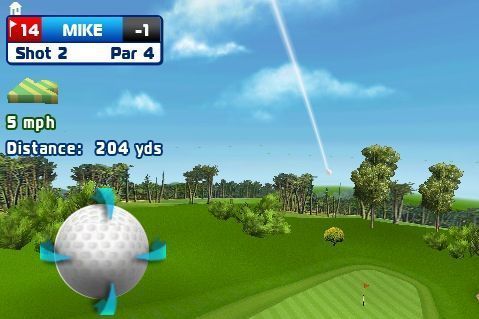
I downloaded the Tiger Woods iPhone game as soon as it came out and was soon underwhelmed solely because it wasn’t as fun as World Golf Tour or even my old Mario Golf cart for the Gameboy Advance SP. I noticed Let’s Golf on the app store and the price was righ especially compared to a DS game.

I have to say it is not boring. As a golf sim, it doesn’t compare to an uber geeky golf game like TW for the PC or Mac, but as an accessible game it is top notch. The graphics are stunning for a phone game and the replay value is high – most iPhone games get played once or twice. I have been playing this compulsively during periods if insomnia on call.

Tiger Woods runs acceptably well, but just bores me after a while. The effort it takes to get in on a game, well -I’d rather golf for real.

A Contest for View Ti Golf download -iPhone Golf GPS App

IMG_0239I was having problems with my View Ti Golf, but the usual fix of removing, resetting, and reloading appears to have fixed it. On my home course, I have made it a practice to keep a notebook of findings, conditions, plays that work, and yardages, so I only rarely use View Ti Golf. It’s when I go to a course that isn’t as well marked and new to me that View Ti Golf shines. My review is linked here.

View Ti Golf, which has never given me any funding or support, recently responded to a support query about the same crashing question. I have no reason to believe that it was the program, but the way that the iPhone apps can interact. I have found them to be a gracious, class act. They have given me a free download of View Ti Golf. Which I will give away to a reader who comments below. The contest will close out on 12am of Father’s Day, US Central Daylight time. I will then program my HP15C calculator to generate a random number between 1 and the number of commenters, and I will run this program five times, picking the fifth result. I will post on Father’s day.

You have to have a valid email. That’s it. It’s a 25-50 dollar value depending on what they’re doing at the App Store.

Good luck.

Motion Capture -tells all and lesson fixes it

addendum 5-19-2009 -sorry about privacy lock that prevented viewing earlier.

I had this idea that about performing motion capture of my swing -kind of like the way you see pro golfers to as they get scanned into the games. They usually have white dots taped on all the index parts of their bodies. Using Apple’s Keynote which also lets you record your presentation, I was able to recreate that motion capture. Taking the series of screen shots, I placed dots on the middle of my cap, my shoulders, my hands, and my clubhead, and then took out the picture leaving just the motion capture dots. Keynote has a wonderful and intuitive guide system that makes this very easy.

I recently took a lesson from the inimitable Bill Rose, pro emeritus at our course. He has the ability to distill swing advice to a minimal few principles. The first thing he said about my swing was about keeping the head still from address to contact. Thin shots -looked up and head went up. Chunks -head went down. I have been able to compensate by moving the hands, and getting contact every once in a while, but never consistently. Strangely, it showed up less in my drives and more in my wedges where missteps seem to be magnified.

The video shows what you can do with about 2 hours on the Mac. Taking Mr. Rose’ advice, I spent several hours on the range yesterday evening and found myself hitting in a 5 foot radius around a pin 150 yards away -consistently. Its one of those moments where you just don’t want to leave the range because everything seems to click. Fairway wood -ohmygod -straight, high and mighty.

Now if I could get this to go on the course. I will film this modified swing later this season if it holds up. The other adjustment was taking out the last quarter turn that took me past horizontal -hands to right ear with full shoulder turn again kept me in the slot and made it easier to keep my head still.