Simple>Complex

IMAG0077

Pictured above are the Blackberry Bold 9930 and the iPhone 4. They demonstrate two divergent approaches to design. The Blackberry has a full QWERTY keyboard and a few more buttons. The iPhone has famously the single button up front, a power, and volume rocker switch. There are people who swear by the keyboard and for them the Blackberry will always be king. Truth be told, there is an appeal to having a physical keyboard for typing out longer pieces, but all of this is trumped by the convenience of a single large screen. There is a principle laid out in The Innovator’s Dilemma (link) regarding disruptive technologies that is at play here.

The Blackberry represents the sustaining technology of an established company, RIM which has been putting out keyboarded email communicators since the days of beepers and the Clinton administration. It offers a load of features and the apparent love of corporate IT with its locked down security features. The iPhone and other copycat Android phones are the disruptive technology that paradoxically offers less features, an apparently less accurate virtual keyboard, and the ire of corporate IT and geeks in general for missing lots of buttons, but offers utility in its screen, simple interface, and applications which can turn the iPhone into an infinite variety of gadgets. With evolution of the virtual keyboard, and increasingly higher resolution screens, and soon to be introduced bigger screen, and an app store with over half a million apps, the iPhone is eating the Blackberry’s lunch.

This is played out again and again and the established companies invested in their sustaining technologies get rolled over by startups with disruptive technologies that initially offered less or inferior specifications but offered utility with simplification. In vascular surgery, this happened with endovascular technology which compared to classic open vascular surgery appears to offer inferior results on some measures, but offers the utility, particularly to patients, of less invasiveness, fewer dire complications, faster recoveries, and ability to reintervene with acceptable consequences.

The Blackberry Bold 9930 is likely the last of its proud kind –highly evolved, beautifully manufactured, but frankly crippled by trying to be more than it should be by adding touch features to its core product –keyboarded email and text. I was told that IT will be swapping all of these out for iPhone 5 in October.

Apple isn’t sitting on its hands either. It is disrupting itself with its change of screen size and aspect ratio, with its change from a 30 pin connector to a 9 pin connector, and its introduction of Siri. Siri, while initially viewed with enthusiasm, is being panned for often hilarious inaccuracies which ironically mirror the gaffs of its ancestor the Newton in handwriting recognition, but it is classic disruption. It offers the simplicity of NO KEYBOARD, and the promise of conversing with your technology in meaningful ways.

Which leads me to my last point in that in a shifting landscape, you have to be willing to adapt or face the fate of the wooly mammoth, the floppy disk, and even the Blackberry.

Addendum: August 15th -I’ve been using this for two days straight. The battery lasts nicely all day -a reflection of RIM’s parsimony with regard to push email, I think. Dropbox and Evernote apps work okay, but the small screen, as sharp as a tack, is still too small and landscape oriented to be useful. While I don’t mind reading at 5point font or less, and am impressed that the display is nearly Retina-display level pixel density, the lack of space is problematic. Also, no obvious way to number lock the keyboard, but the keyboard does contextually switch to a num lock state, I think. The limitation of the OS to 192mB of total application memory is painful to even think about in this day and age. I don’t think RIM has the time to get this right after wasting so much time getting it wrong.


Addendum: I do have to remark that the screen on the 9930 is amazingly bright and visible in bright daylight and at all angles. The newest downer of the day is when you update or install an app -you are asked to restart which can take upwards of 2 minutes.

Major Surgery -on a Mac Mini

Image

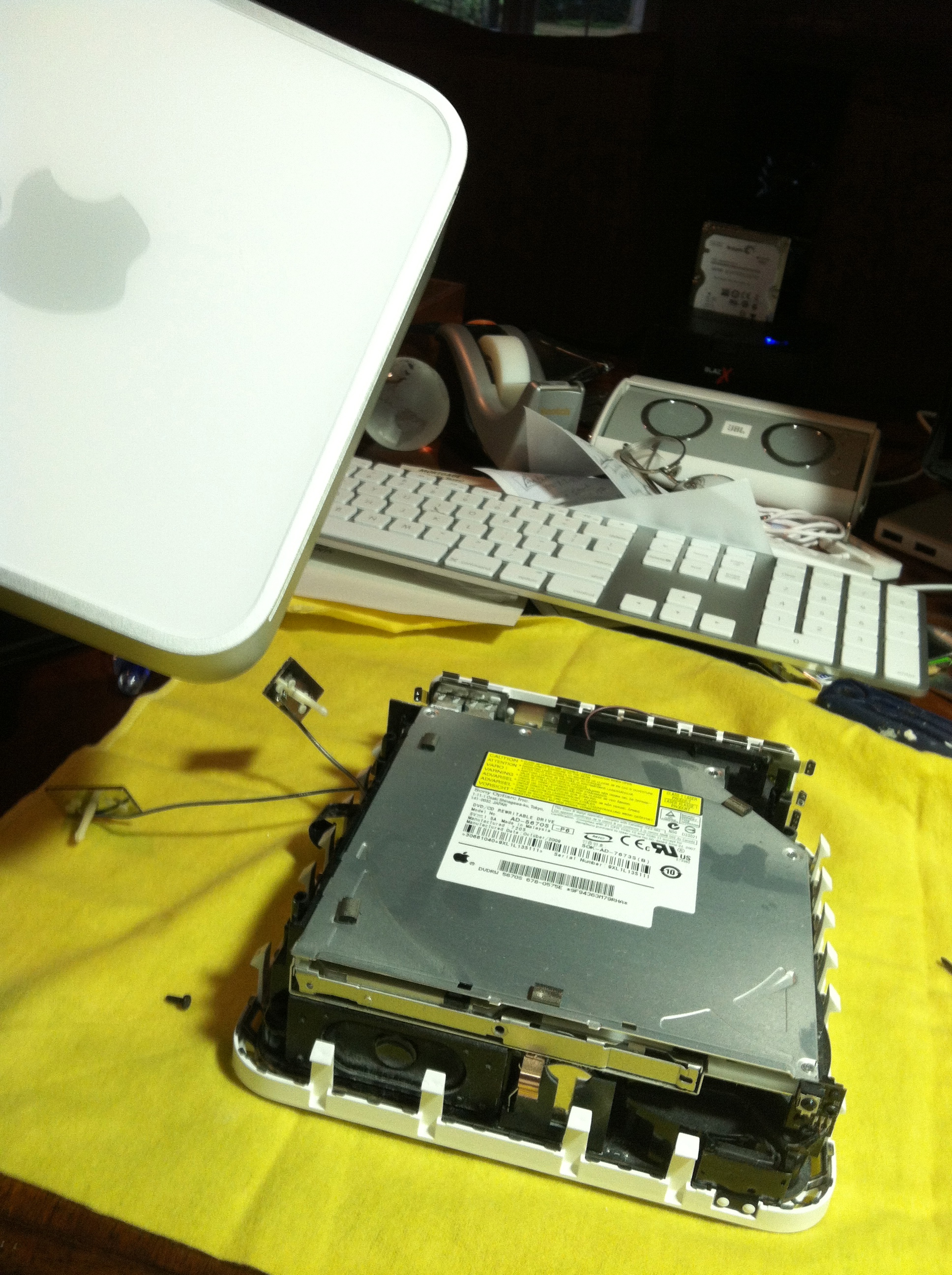
My Mac Mini, purchased in 2009, was beginning to choke on simple tasks and be generally slow as molasses, and I was considering retiring it. It was attached to our TV as our media player, but after trying Apple TV, I decided the latter was far superior, especially after the addition of Hulu+ to the mix of iTunes, Netflix, Youtube, Vimeo, MLB, and Photostream.

I had been using my MacBook Pro as my desktop, but found it to be more useful as an actual laptop, so I moved the Mac Mini to my desk but found it to be, well old. If it were a Windows based system, there would be no question where it would be headed -the recycling bin at Best Buy after I tore out the hard drive. But after I investigated the Mini, it turned out to have two problems -the 160 GB hard drive was nearly full and was a lowly 5400 RPM disk. Also, the stock Mini came with 2GB of RAM. The hard drive would need to be upgraded and I found a nice 750GB SATA drive spinning at 7200 RPM which would speed things up nicely and allow me to create a generous Boot Camp partition (lets me run Windows). The RAM was upgradeable to 8GB. Both upgrades ended up totally $150 from Other World Computing which specializes in upgrade packages for older Macs. To answer the obvious question -I declined using an SSD drive because it would be over $200 for a reasonably sized drive, and I wanted to keep costs down.

The instructions for surgery are on the internet -the OWC site’s videos are comprehensive, but start with the caveat that the upgrade should be done by a professional. If you can replace the batteries on a toddler bath toy, you can kick this. The upgrade was very easy and took all of 10 minutes after cloning the original drive to the new one (using Carbon Copy on trial, does need a SATA reader) which took a few hours. Booting up was noticeably quicker and the computer seemed happier after the brain transplant. I also took the opportunity to blow out a lot of accumulated dust in the machine.

After surgery, the “About This Mac” screen shows the new RAM.

The great thing from doing this was setting up Windows 7 in a Boot Camp partition which gives you a clean install of Windows. The Mac Mini is a GREAT Windows 7 machine, and runs very snappy.

One of the things I regret about the move to increasingly hermetic systems like iPad and MacBook Air and the recently released Retina Macbook is the loss of the ability to upgrade the Mac. This Mini is now good for another 3-5 years as long as Apple supports the upgrade to this system. As a Windows machine, it will probably not get Windows 8, but Windows 7 will be supported for the next 7-10 years if Windows XP is to be used as a rubric.

Samsung Galaxy Tablet 2 7.0 -brief review

image

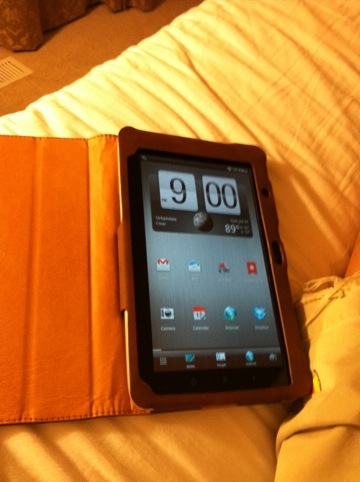
The annoyingly named Samsung Galaxy Tablet 2 7.0 came out last month and I couldn’t hold off picking it up because my other 7 inch Android tablet has been appropriated by my 3 year old for video watching. Turns out, while traveling, the 7inch tablet is easier to hold than an iPad. I have become a fan of the 7 inch form factor, and because most of my work is done in email, Evernote, and Dropbox, across multiple platforms, it really doesn’t matter what gadget I’m on, as long as these cloud services and apps are available.

I was first struck by this device as being more business oriented than previous tablets, having charcoal grays that would look good in a boardroom. The front is Gorilla glass, the back is a high quality plastic that feels good in the hands. There are front and back cameras and Instagram works fine from either sides. It is thin enough. The 7 inch tablets work well for me in the hospital because it fits in my pocket. All the medical apps work, and in a pinch, Citrix is usable for accessing the hospital and office data. I can also read my Kindle books and watch Netflix and Hulu, listen to Pandora and Spotify, and via Google Play can cloud base my iTunes for my Android devices, or as I have done, park the non-DRM files on a 64 gigabyte microSD card with room left for over 25 feature length films.

It runs well, has between 6-8 hrs of battery life. It is much more user friendly that it used to be, but really, if you can’t set up your own email account, you shouldn’t be given a computer. Amazon sells a faux leather book cover which works and keeps things corporate.

It will run Amazon media via Flash, but who has time to watch Downtown Abbey when you have four seasons of Mad Men to catch up on? Flash kills your battery life (we know, we know), but there are times that it is convenient although every year it is less so as Apple and Microsoft have abandoned Flash.

Ice Cream Sandwich (ICS) is much more touch friendly than Honeycomb which killed the 10inch Android Tablet in the crib. The Tablet 2 designation is correct in that Samsung is positioning itself as an Apple alternative in the post PC world. I like ICS because you can customize. The problems Android had when I had my Droid 2 from Motorola/Verizon are note apparent -contacts come up fast on emails, and Facebook and Twitter are laced into the OS. It doesn’t crash. Individual apps may but the whole OS no longer dies. I see no need for a task killer so far.

Why did Steve Jobs hate the 7 inch form factor? It didn’t jibe with his four square grids on his keynote presentation. As he said, you’d have to file your fingers down to nubbins to reach the right size – this is not true. I think it was a mistake on his part. The fact is that industrial gadgetry is market begging to be filled by the void being left by BlackBerry. Doctors want a tablet, but one that doesn’t need a murse or a satchel to carry.

This tablet at 249.99 at Best Buy is more expensive than the Fire, but I think it does more. Even if you are wed to iOS, the fact that most of the big apps like Instagram and Angry Birds are available means that it doesn’t matter which one you have. I am preferring subscription services like Netflix and Spotify because of their ubiquity on multiple devices. Subscriptions make more sense because you don’t need to take up precious storage space for media when you can have it in the cloud -the tradeoff being the need for a broadband connection.

Other neat stuff -it features a universal remote and IR blaster, letting you turn it into a very cool feature rich remote. The app also tells what’s on TV -it would be wonderfully convenient if it just displayed the TV as well, no?

It’s a good time to be into tech. You have options. When Apple does come it with a 7inch iPad, you’ll have even more.

Plague, Inc. A Review

20120612-085846.jpg

This is an addictive game that takes macroeconomics, epidemiology, and microbiology, and creates an ultimately bittersweet game out of human extinction. I called my first plague Paltrow, and it defeated humanity by taking advantage of human behavior -why let a “cold” epidemic derail the London games which can spread disease to the four corners? If you make the disease a tropical one, the “developed world” ignores it. Make it go to the first world by conferring cold resistance and interest spikes in a cure. Remember not to make it too deadly at first or it won’t leave the country.

I remember in the 80’s playing blue and red team games for the government interested in seeing how some Ivy Leaguers would play out a Kobayashi Maru type WWWIII scenario. This is a red team scenario and it proves one thing -an extinction level event needs a steady hand to guide it.

20120612-085755.jpg

Apple’s Impact on CES

20120110-102839.jpg

It seems CES is all about reacting to Apple -Ultrabooks that are indistinguishable from MacBook Airs, smartphones that try to beat iPhone on features, cloud services that plagiarize Steve Jobs presentation slides, TV’s you talk to that try to preempt a Siri hosted Apple TV. The best stuff is when they try to be themselves, like Windows Mobile which is not very Microsoft in that it is stylish and easy to use, again like Apple.

When irony is so obvious, it no longer is ironic. It’s just sad. It’s just a bunch of small fish in a small pond. A tall hobbit contest.

The HTC Flyer -Review (a Kindle Fire alternative) -updated with Honeycomb!

Jan 24- okay Hulu works but Netflix does not (but I did get update last night so don’t judge yet). The annoying thing is I have shortcuts to three apps -medscape, epocrates, and dolphin browser, whose icons revert to a generic android app icon. This is a small but really annoying bug affecting just those apps.

Battery life seems better, but not hard numbers. Amazon runs fine for video over Flash but the tablet gets hot. Will try the updated Netflix app and will report.

ADDENDUM 1-4-2012 –

HTC has sent an over the air update of the Flyer to full Android 3.2 Honeycomb. Visually it’s great and appears to be working without a hitch. The only complaint that I have so far is that Hulu is broken (as of 1-18-2012 -Hulu now works fine but netflix still does not), and Netflix app runs with significant asynchrony between the sound and video. I haven’t had a chance to try Netflix via Flash, but other Flash runs well.

Will update as I use it more, but the great thing is that HTC actually supports their device beyond sale! That is a surprise for me.

Addendum 1-5-2012 –

I will be frank -I was dubious of any great improvement with Honeycomb, but I like it. It is Honeycomb 3.2, which is far more evolved and stable than Honeycomb 3.0 or 3.1 pushed by Motorola when they prematurely released the Xoom to disaster during the holidays of 2010. It is as stable as the Gingerbread 2.3 was (and will be when you buy the Flyer). I keep hearing differing reports about the appeal of Ice Cream Sandwich, and I can assure you, 4.0 and 4.1 will be the beta for 4.2 which will be about late 2012 or early 2013. For most people, that means buying phones that occasionally (or frequently) crash and waiting for the small chance that their manufacturer will update it. Don’t hold your breath if you purchase Motorola. I don’t have any experience with Samsung, but the business model just does not support upgrading the operating system for phones and tablets that have already sold because the manufacturers have no skin in the App Market game. The only exceptions are Amazon and Apple. Google will eventually realize with increased pressure from Windows and the churn out from Android to iOS that it really has to go to a OS support model where they dictate upgrades. The other option, which HTC appears to have opened their phones up to, is the official yet unsupported and warranty killing jailbreak. Rooting your phone or tablet will give you access to the great open source community – I enjoy the XDA developers forums because I like hacking old hardware.

That is the final point -in this era, THERE IS NO OLD HARDWARE, only unsupported software. Every manufacturer aside from Apple has no incentive to upgrade their software because they don’t own it. Apple will to make sure the Apps sell and their devices keep their intrinsic value.

I just upgraded a Compaq Presario V2000 with the latest Ubuntu and with another 2GB RAM, it runs Chrome FAST. This is a 6 year old laptop! If you stuck with HP’s software, you would be stuck at Windows XP SP2 with no upgrade path as they have abandoned support of their 64bit Athlon processored laptops. While I understand why they do it, it breaks my heart to think about all the computers that end up in landfills just because the software is no longer supported.

HTC Flyer with Honeycomb is a tasty treat. It hasn’t crashed yet in over 2 days of continuous use. I am disappointed with the lack of Hulu, and the curious asynchrony of video and sound with Netflix is annoying, but it is trumped by the new tablet level utility of Honeycomb. The functional notifications scheme is worth it alone to upgrade -you can now cancel out notifications rather than launch every facebook update and app update to clear the notice out.

Addendum 1-8-2012

I created this doodle with Sketch by Autodesk using the stylus. The stylus works throughout the tablet and not just in the context of a screen capture or Evernote entry. This is a big deal because I’ve always hated the meat stylus associated with the iPad for painting. This is very very cool.

Original Post from Summer, 2011

After leaving my iPad 2 in the hospital for the 3rd time -and tracking it down and having it returned -there are great benefits to living and working in Iowa, I decided to look into the 7 inch tablets. Apple famously does not make or plan to make a 7 inch tablet. That is unfortunate because for physicians, the 7 inch tablet is the perfect balance between screen size -big enough to show patients and families pictures, and portability. The 7 inch tablet fits the doctor’s white coat pocket.

I purchased mine, a 16gB Wifi unit, from Best Buy -$499, along with the pen accessory -$80. The inclusion of a pen accessory is a decidedly retro move, but the way it is implemented, at once brilliant and half baked -more on this later. The Flyer is a little more tall than the iPad 2 is wide. The screen, made of Gorilla glass, is bright and easy to view from multiple angles. It comes in a white box, beautifully packaged inside with white wires -a USB cable and a dedicated charger. Although it uses a proprietary dongle, it will take a micro USB connector, and I recharged it on my Kindle’s USB cable last night. The Flyer is a 7inch homage to the iPad and Apple’s design. It is iPad like in every way. It is sturdy and thin. Battery life is outstanding -there are reports of 12 hours. I went all day on the device and it still had half a charge. The decision to go with a fast single processor was wise, as adding a dual core chip would have resulted in larger battery needs.

It runs Android 2.3 Gingerbread -the phone OS, and not 3.1 Honeycomb -the tablet OS, and that suits me fine. I was tortured by Android 2.1 on the Verizon Droid 2 until iPhone on Verizon came out. The combination of middling hardware and deployment of what was basically a beta level OS made the Droid 2 torture to use. That said, Flyer runs Android 2.3.3 which is much more evolved than Honeycomb -the Tablet OS. Running on a fast single processor, the Flyer really does fly, and is stable. Much more stable than Honeycomb, based on my perusal of the tablet display at Best Buy (a showcase of how NOT to sell stuff) where I got the Galaxy tab to stall on a Flash page, the Xoom to freeze by swiping too fast, and never got the HP’s tablet to get out of its sales screen. In 4 straight days of heavy use, Flyer has yet to crash, freeze, stutter or otherwise misbehave. I will know more after a month, because the Droid 2 had the problem of gumming up its works unless you actively cleaned up the junk every few days (including hard resets every few weeks).

The OS is stock, enhanced by HTC’s Sense UI. Of all the manufacturer add ons, HTC’s Sense works the best in my experience. Motorola’s support people suggested I turn off their custom interface (called Motoblur) to make their device work! HTC’s widgets and apps work well and are beautiful to look at. While the phone based software does cause small text, in the readers -the Kindle app, the Google Books app, and others, the text is nicely resizable. Flash support is there. I am Flash agnostic, but it is convenient for running sites that are Flash heavy like ESPN and Golf Channel. Flash does appear to slow down the web pages, and reportedly will shorten battery life.

It works well with my workflow -my scheduling and email are done through an Exchange server and everything just works. Citrix runs well and the hospital side software including the labs and PACS shows up fine. Our EMR should work, but I have had trouble getting it to work. Notably, my MobileMe email won’t sent email, and I downloaded the open source K-9 email client and now it runs fine. Amazon app store runs great. I am hopeful that Amazon will release its Kindle media software in conjunction with its own tablet, allow the full Amazon experience on all Android hardware. Most of my iPad apps have their Android equivalent. Notably missing are Hulu and Netflix players, but Amazon should make up for it.

This is a great device, and will stay in my pocket for a while.

7-28-2011
This device is glued to me. While I love my iPad, its nonpocketability relegated it to my bag along with the stethoscope and macbook air -coincidentally all three now get used about once a day. It really hasn’t frozen or crashed, and goes all day without hitting empty. If I were Apple, I would rethink the idea of a 7 inch tablet.

And speaking of sasquatch and unicorns, I would pay full price for a keyboarded iPhone.

July 31, 2011
Just got this faux leather cover from an Amazon hosted merchant. It copies the iPad 2 cover in having the tri-fold cover that acts as a stand, and a magnetic clasp. It has a two tone theme that makes it look like one of those leather Piel Frama cases. The case also copies the iPad 1 case in that the Flyer sits in a pocket with a leather flap that tucks in around it. There are cutouts for all the camera and controls and speakers.

Using this, it really is a perfect portal to Evernote. It also is a great reader, and is a portent of how the color Kindle tablet will look. The screen is near retina scale with beautifully saturated colors.

20110731-210639.jpg

August 21, 2011
Just had a thought. Amazon will release its tablet into this 7 inch tablet space and not directly confront Apple, all the while updating its Kindle App to include media -music and video and make it universally available. It fills in all the gaps that Apple left in its current offerings. How awesome would that be.

Also, after a month of use, I find Flyer to be stable and quick. This was a pleasant surprise because my first experience with Android was with the Motorola Droid 2 which was a textbook case of why Android would not win. Flyer is the textbook case of why Android could win over iOS. It marries the OS to the hardware perfectly like a well blended wine. The 12 hours plus of battery life could only be achieved by avoiding dual core processing, but speed was maintained by over clocking an already speedy single core processor. By using Gingerbread (2.3.3), it accesses many more apps than by going with Honeycomb (3.1). Gingerbread is more evolved than Honeycomb, and it shows in the stability of Flyer compared to my Droid 2 which ran 2.1. While Droid 2 got slower with use, Flyer has maintained its speed without the need for task k
20110821-053657.jpg

illers which I consider to be an egregious hack that highlights the flaws of the underlying software. I added a 10x 32gigabyte miniSD card for loading movies that I burned from DVD -a luxury, but definitely not a need as the device was working fine.

The cloud combined with fast network access trumps the need for large storage capacity. Rhapsody, which I have used for a while, and Pandora, fulfills any music needs.

But I’m waiting for Amazon!

August 31, 2011

I have gone more than a month and have not had to hard reset this device. This is amazing because I went through two Droid 2’s -replacing and hard resets as recommended by Motorola support failed to correct the increasing instability of that device that occurred with continued internet access and use of contacts and scheduling -basic functions! Writing a person’s contact into the outgoing address field instantly brings up a list winnowed from my contacts list of over 2000 people. Only iOS and Palm devices did this consistently well in my experience. My friends who own other non-HTC smartphones relay similar difficulties -I think this has to do with Android 2.1. I have to comment on this fact: that carriers and maybe some manufacturers seem to avoid updates of their smartphone OS’s simply for the desire on their part to have customers buy new devices rather than update. I even see this with my iPhone where Verizon mysteriously does not have iOS 4.3.x for its iPhone which would allow cloud access of prior purchased iTunes tracks among other upgrades. Android’s problems have less to do with bad programming than to do with Google’s ability to herd cats.

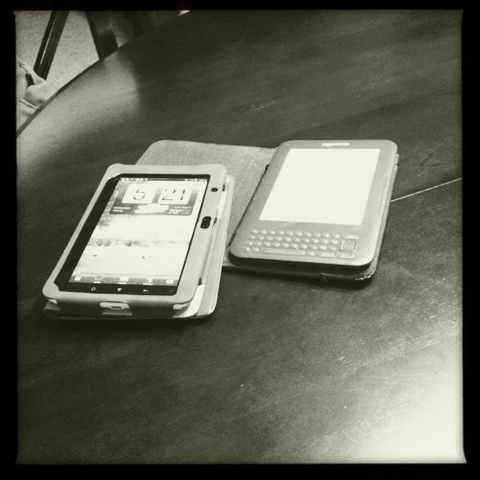
Flyer next to its analog ancestor

Mission Critical -this is a term I use personally to describe the need for a device to function perfectly. While no gadget can reach this standard, medical devices, space satellites, and Mars Rovers have a need for their operating systems to be bulletproof. Psion’s EPOC OS, was in my mind, written with mission criticality. On my 1998 Psion Series 5, I could have over ten open programs without a freeze or a crash. The monitors in the ICU all boot up and run without fail -mission critical. Flyer is beginning to edge into that space of mission critical in my mind -I have yet to perform any administering to memory, any supplication to the support desk, nor any return to factory settings after a month of nearly daily use in my hands. Mission Critical!

Update: 11-11-2011
I felt the need to make a comment about Flyer not that Kindle Fire is out. If I didn’t have the Flyer, I would probably get the Fire, but now that I have it, I am very pleased overall. It gets Hulu and Netflix streams via apps, and Amazon Prime Videos are available via Flash on the Browser. I recently picked up a leftover WebOS tablet bluetooth keyboard which is basically a black, plastic, nearly flawless copy of the Apple Wireless keyboard for the clearance price of $22, and pairing with the Fire, it behaves admirably as a a text input device.

That is the other thing -Evernote access is built into the DNA of the Fire. When you scribble a note on the note app, it goes to the Evernote servers, and I think get processed so they can be searched. I know pictures of text that I take certainly become searchable on Evernote. This means that Flyer is a reasonable stand-in for the spiral bound notebook.

The Kindle app works great on the Flyer. While I prefer to read on the physical Kindle e-reader which is easier on my eyes, in a pinch, the Flyer is a fine e-Reader. Zinio, on which I have a MacUser and Field and Stream subscriptions works well on Flyer (as it does on my iPad2).

The current price of Flyer is 299 at Best Buy, which annoys me because I paid the early adopter price. I think it is worth thinking about the $100 price differential when considering Fire versus Flyer. I personally like the flexibility of being outside Amazon’s cage and the killer app for this device is the Evernote capabilities. The average potential consumer of Amazon based media will be fine with Fire, but the more computer savvy will be looking to root Fire and open up the Android capabilities. I’m perfectly happy with my Flyer.

HTC recently sent an OTA (over the air) update of the OS. It’s not Honeycomb, but rather an update of Gingerbread which again works perfectly fine for a 7 inch tablet. I hear that the dual core tablets running Honeycomb are susceptible to lag -there is absolutely no lag on this machine and I only rarely get a reboot due to an instability in Sense -at the rate of once every two to three weeks. I used to reboot my Motorola Droid2 every day!

BTW, I typed this whole update with the keyboard on the WordPress app.

Inside of MacBook Air Looks as Good as the Outside

I ran out of hard drive space on my 2010 MacBook Air, and so I decided to upgrade the SSD. The OtherWorld Computing SSD kit and instructions are very straightforward. Opening th MBA reveals shockingly clean lines that are frankly beautiful and fits with the Jobsian aesthetic of being beautiful in the totality of the device. I felt like I was looking at an alien artifact. The fan which you didn’t realize was there has silent gears and fits in organically. It was like operating, changing out the SSD.

image

12 Used Things to Get For Your Favorite Surgeon

One of the most popular posts on this blog is a gift suggestion list I put together last year. Surprisingly, every item remains fresh –even the iPad and Macbook Air. Because of the terrible economy, I thought that “gently used” and “pre-owned” items deserved their time in the sun. Add to the list last year’s model which technically isn’t used, but still a great bargain. Here it goes.

1. Gently used Porsche –these were in fact easier to get in 2009 after the crash, but the lots are full especially in tony but transient locales like the Hamptons, Aspen, and Lake Taho. My particular favorites are the 911 turbos from the 80’s and 90’s. They have go cart like handling and are plenty fast without costing more than a new Hyundai.

2. Sony NEX-5, last year’s model. The lenses for the new one fit. The cameras have been updated, but there is no need to buy the latest and greatest here. Why even bother getting a SLR quality camera when your smartphone takes nice snaps? I agree, there is no reason to buy a point and shoot camera when the iPhone and others take excellent snapshots, but to take great macro shots in the OR or beautiful portraits and landscapes, a great camera and lens still wins. Ansel Adams could not have produced his masterworks with an iPhone.

3. iPad2 in a few months –they are plenty fast and because I have never used Siri, I don’t miss it yet. The iPad2 does everything that the original iPad does about 20-30% faster. The device is definitely thinner. Facetime is GREAT and brings the promise of videophone to life. The Android manufacturers don’t realize that not only are they competing with the to-be-announced Retina display, Siri equipped iPad 3 in April, they will be competing with the millions of iPad2’s that will be sold on eBay when current owners upgrade. The wonderful thing about Apple is that Apple updates the operating system unlike 95% of Android manufacturers, and that devices going back more than a year are supported in these upgrades, which means many years of usefulness for iPad2 and last year’s iPad.

4. Tiny Laptops –When released, tiny, pocketable laptops like the Sony Vaio P series were very pricy toys but now they are available used for a significant price reduction. I recommend getting a late generation model with the SSD hard drive. These fin in the coat pocket and will allow most physicians get onto their hospital information systems –something cumbersome to do on a tablet. The Windows 7 devices will also let you run iTunes letting it be a very nice media player. The only downside is the short battery life which can be augmented with an extra battery or one of those combo USB/laptop batteries –I use the Eveready branded ones as they allow you to simultaneously charge a smartphone, a laptop, and itself.

5. Old school iPods –the iPod 5th generation, also known as the video iPod, is readily available used on eBay cheap and come in 30 and 60gB sizes –usually more than enough for most music libraries. The only trouble with them is that the batteries are often run down –that’s usually not a problem as it costs about 20 dollars and fifteen minutes to swap one out. The older iPods work well with most automobile maker’s iPod docks which for some unfathomable reason are several years behind at the time of release. The original Bose Sound Docks and the Apple branded iPod speakers (very hard to find) are wonderful loudspeakers and work great with these older iPods. The older iPods are durable and won’t break the bank if you leave it behind in the OR, unlike an iPad or an iPod Touch. I recently acquired an iPod Mini from my dad who never really used it, and I not only changed the battery on it, but I swapped out the 4gB compact flash hard drive for a 32gB solid state hard drive –instructions are widely available on line.

6. High end automatic espresso machines. My recently acquired Saeco Incanto Sirius espresso machine will grind and brew perfect espresso and lattes. When purchased new, they are well over a thousand dollars, but you can find them used for a couple of hundred. The great thing about these is that there are resellers of these machines on line, and finding spare parts and repairing them yourself is pretty straight forward. Once you try coffee from these machines, you will never go back to Starbucks, or even remotely enjoy the swill from a Keurig.

7. Used Kindle 2 –Kindle 2’s, the black and white ones with the keyboard are trickling on to the market as the newest array of Kindles come onto market. If you can find one for under $50, you should snap it up because the secret about the Kindle 2 is this: the always on 3G connection and the “experimental” web browser. You never have to pay a subscription fee, and for reading text and email from the web, expecially if you set up a web news reader account well, you will be surfing away anywhere in over a hundred countries without paying wireless fees. Plus, you can read your books. In the sun. I was initially against ereaders, but being able to download and read hardcover books for 10 bucks or less, and carry several hundred around at a time trumps any antediluvian “I love how an old book smells” sentiment. That old book smell, by the way, is likely a potentially deadly mold.

8. Used Aquariums –The one thing about people moving around a lot is that aquariums don’t move well. People once excited by Nemo suddenly find the cost and time involved in taking care of fish to be a burden. The key is avoiding salt water set ups and focusing on self sustaining easily breeding fish like guppies that don’t need to be harvested from the tropics. The maintenance is minimal in fact if you go for a natural museum presentation with algae and freswater plants as well. The water from these tanks should never be thrown out –they are incredibly fertile natural plant food for the garden and potted plants. Best found on Craigslist and local barter sites, the sweet spot is 10 gallons and up.

9. Used Big Televisions –while flat screen televisions are cheap, the 60 inchers are considered the high end and still command a premium price. The increasingly obsolete DLP (digital light projection) televisions can be found used for sale and have excellent pictures particularly in the darkened home theater setting where being flat isn’t critical. The important thing is making sure the connectors are up to date –HDMI is a must. The other bonus is that these televisions are incredibly light –they’re mostly air.

10. High end stereo equipment from the 80’s and 90’s. Those ten thousand dollar stereos from twenty years ago are now considered junk because of iPods and iPod speakers have largely obsoleted CD players and standalone stereos. That said, the sound coming out of high end used speakers and a quality amplifier like the NAD amps which will accept the audio out from an iPod via RCA jacks is both loud, amazing, and cheap. Most kids don’t have the experience of listening to Pink Floyd at full volume through six foot tall speakers.

11. Used Golf Clubs –There is really no need to pay top dollar for the latest clubs, but most amateurs start and play with clubs that hurt their scores from overwhelming age or cheapness. There are certain clubs that will improve play which were amazing when they came out and still play better than the entry level kits from Walmart or Costco. Vintage Ping Irons –the Ping Eye2’s, are forgiving, durable, and very easy to find in your size. Perimeter weighted Maruma’s and Honma’s –basically hand carved Japanese irons that were several thousand dollars when new, can be found for a few hundred or less on eBay. Best person to ask –any long term golfer –ask them what were their dream clubs in the 1990’s. Most of these irons can be regrooved with tools from the internet –while illegal for tournament play, for the average golfer, these rejuvenate older clubs for use. All they need are new grips.

12. Projectors –8mm Projector and slide projectors –if you have old cans of 8mm movies or boxes of slides, you can have them digitized for a fee, but its much more fun to watch them through original equipment. The missing link is usually the projection equipment which was often fragile with now hard to replace parts. Fact is, these can be found functioning and make for incredible family activities around Thanksgiving or the holidays. Imagine screening wedding footage from the 60’s or 70’s or vacation slides from your parents childhood. The 8mm film and 35mm slide are the least accessible of the popular consumer medial technologies of their times, and being able to show these films and slides with the clickety clack of the projectors, the shuffle of the carousels, with live narration of the subjects (while they are still around) is worthy of filming with your smartphone.

Merry Christmas to all.

20111218-180718.jpg

20120102-092001.jpg

Social Animal Network

image

We’re inherently social. It is imprinted in our nature to bond, communicated, and organize as packs. This trait, the instinct to gather, seek out each other’s company, to seek approval, to argue, I would argue, is as much a distinguishing species characteristic as spots on a Dalmatian, and is one of the reasons for the explosive growth of Facebook. We, each of us, need to be part of a tribe, and when the tribes were destroyed by the onset of modernity, they awaited a mechanism to be reunited. Think about it –up to the 2000’s, people had to rely on the usual methods of connecting with their old tribe –telephone, email, actual contact which relied on deliberately remembering to keep in touch which none of us were really good at. The casual intimacy of living in a village with a commons, of having a favorite popular coffee shop, a dorm common room, when you move on the people you said hello to moved on as well. Now they follow you forever in Facebook.

It may or may not be a good thing, because if you have a village, even a virtual one, there will be a village idiot or two (I may be the village idiot). I have become reintroduced to my best friend from kindergarten and there are eerily similar things that we are passionate for –coffee, scatological extraversion, and Apple worship, that brings daily a smile. The shy quiet girl who sat in the back corner of high school English class turns out to be a world class smarty pants –a nicely maturing red wine with a kick in the middle and a lingering finish. I’ve even made new dear friends among friends of friends. They occupy my particular village, some I speak to every day, some every once in a while. It’s the tribe I’ve accumulated over the decades.

It also has implications beyond the sharing of holiday pictures and links to funny cat videos. It returns us to a kind of social organization that was only possible when people physically lived in villages and neighborhoods. The outside world is invited in by the denizens of these villages, but the human tendency is to be insular within the family, the tribe, the village. It may not seem like a big deal to us living in a constitutional republic, but when Facebook is available to those living in places less free, their time amongst their friends must be as important as air and water. Facebook has created a virtual planet for us to inhabit, a brave new world.

The Attraction of Tiny Computers: Review of the Last Generation Vaio P Series Mini-Laptop

Image

The Attraction of Tiny Computers

If you look at sites like dynamism.com, you will see a hidden world of tiny computers that come primarily from Japan and South Korea. At one time, most personal digital assistants came in the clam shell form factor like the Psion Series 5 and Sharp Zaurus, and it was their combination of portability and reasonable touch typability that kept me a fan all of these years. It’s just that Americans don’t like tiny cars, televisions, and definitely not tiny computers, and they fell off the market here. Thankfully, they are still popular in other parts of the world and super portable, even pocketable computers with full keyboards are available.

The Sony Vaio P is an example of one of these tiny computers that never really caught on –the US public just doesn’t get it. One review complained it didn’t fit well in any particular category –neither smartphone, tablet, netbook or laptop, but I beg to differ. These are computers perfectly suited to me and many other like minded mostly Asian guys based on the current source of these computers.

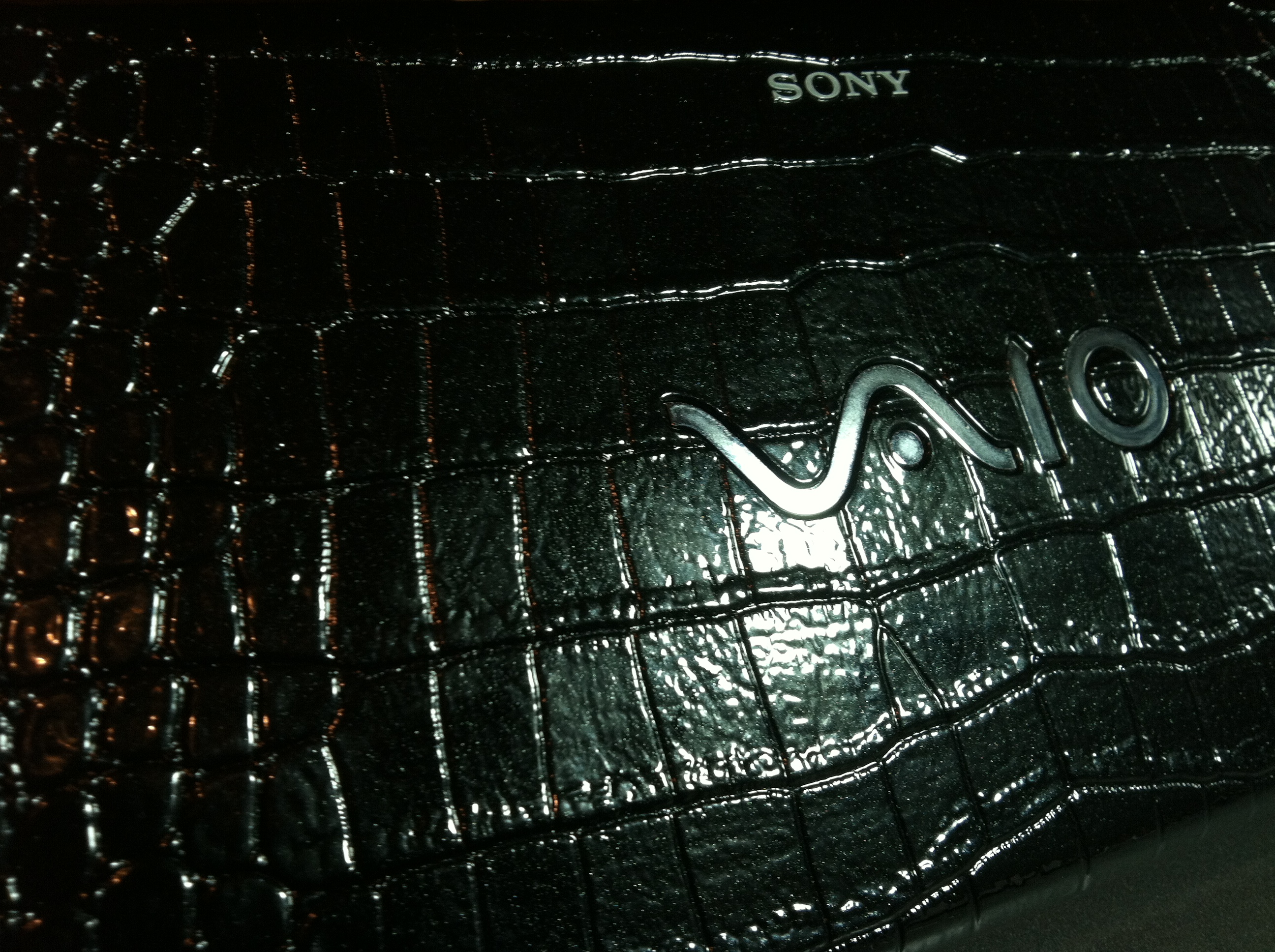
The Vaio P is definitely a looker –Sony has always emphasized form over function and this one which I picked up second hand from a colleague reflects that attitude in spades. It is the last one made, and it has a 128gB solid state drive (SSD) which in normal computers greatly speeds up function. The top cover is a faux alligator textured plastic with silver lettering making the device look like an expensive lady’s clutch purse –I know, I know, but I picked it up at less than half price. The keys are small but perfectly functional for touch typing. The pointing nubbin in the center of the keyboard, a prime feature of Thinkpads, works okay but the silvery plastic cap has fallen off revealing the rubber eraser head underneath which I’m okay with. There is also an optical mouse on the screen with right and left buttons to the left of the screen which would work okay if I was thumb typing, but with the width of this device, is basically useless.

The screen is incredibly detailed and pixel dense, but at the cost of really tiny lettering which I’m okay with but most US users are not. Windows 7 looks great on this machine. Boot up is meh –the boot up times are not consistent with an SSD, making me think that Sony either cheaped out on some component or just never fixed the drivers. On my Macbook Air running Windows 7, it boots up under 15 seconds, but on this machine, cold boot is over 20 seconds and not much faster than prior experiences I had with netbooks. The battery life is apparently miserable at 2-3 hours –this is again Sony going for looks over function. An extended battery is available but hard to find on line as every Vaio P purchaser has grabbed one and Sony no longer offers it.

The computer is crawling with crapware –not all of it put on by my colleague. Manufacturers do it to make money, but at the expense of degrading their product. It’s as if you buy a car and stuck in the glove compartment are trials and subscription offers, occupying the back seat are boxes of trial gadgets for “improving” your car. Don’t get me started on the stickers –I got rid of them first thing as they uglify what is otherwise a very spiffy piece of kit. That is why I love Apple products –they’re made with the loving care of a bespoke tailored suit, a hand made golf club, or premium furniture –even the insides, if you have access to it, are pretty. The only problem is that Apple does not make a super tiny, pocketable laptop. Even with the garish black gator skin top cover doesn’t bother me too much because I’m not a Starbucks goer.

Why do I even need this thing? Windows 7 on the move. The Macbook Air doesn’t fit in my white coat pocket, but this will. It also has a SD card slot which is handy for processing and sending pictures. I’m already shopping for the 4cell extended battery –seems like the original Sony batteries are off market and I’ll have to settle for a Shenzen special off eBay –the last one I got for a Dell hackintosh I used to have didn’t fit until I drilled some holes into it but worked great afterwords. The seller admitted it was a problem but you get what you pay for.

Tons of Buttons

Addendum 11-23-11: The specs on this point to it being one of the last Vaio P series made -it has an Atom Z540 processor going at 1.87GHz, 2GB of RAM, and a 128GB SSD. It comes loaded with Windows 7 Home Premium. Having used it now for two days, I think the complaint of poor battery life with the stock battery applies with heavy multimedia and internet usage -stuff I would normally do on the iPad. With the Wifi and Bluetooth turned off via a handy switch on the side, the battery goes about 4 hours. I have an extended 4 cell battery on order from China -always an iffy proposition, but should work. The cool thing I discovered about the device is a fast-boot browser only mode that launches a minibrowser without booting into Windows -I’m assuming its a Linux variant. It has a Chrome OS feel without any of the widgets -I haven’t run it purely in this mode and can’t tell you if battery life is any better, but the browser works for checking email, reading casual news. It could work to access Google Docs for composition, and has a link to Evernote (note to self -Evernote will be available feature on every wired device on the planet in ten years). This quick launch mode has its own hardware button along with a recovery mode which also has its own button, and a third mode which I haven’t figured out yet. I did remove a bunch of programs during my de-crapware-ification and may have eliminated this feature, but I’m not missing it. It’s so anti-Apple, this abundance of hardware buttons, but the geek in me likes it very much.

I got Outlook running with my work Exchange account without a hitch, and all my other accounts work okay. I’m getting over the faux gator skin cover on top slowly, although I am lurking on eBay to find a broken series P laptop to replace it. Flat black or white would be fine. People put these up for sale occasionally for parts. The pointing stick was never a favorite of mine going all the way back to their introduction in the mid nineties on the IBM Thinkpads. The optical mouse is atrocious, and I’ve dug up a mini-sized two button USB mouse to use with the device. The tiny screen is not for everyone -a lot of people will get frustrated and will get eyestrain from it. The fact that Sony

My Computer has (fake) Alligator Skin!

packed it with pixels on a very bright screen makes it readable for me even when the letters are the size of sesame seeds (a Korean idiom). I’m still puzzled why the device seems sluggish even with the SSD which is capacious while empty. There are two slots in the front, one for an SD card which can be placed flush, and another for Sony’s failed Memory Stick format.

I have heard on the internet that this device will run Linux well, but I would like to keep that bottled up for now. More intriguing is the new ability of Virtual Box to run Mac OS X Snow Leopard. That would be great! Will update.

I don’t think we’ll ever see the utility of a Psion series 5mx, but very few people ever agreed that it was a good thing to be able to touch type on a pocketable device. The only people who seem to agree are Japanese salarymen, the odd English physician, and occasionally people in South America.  I’ve included a list of very small clamshell computers which have gone extinct this year. I don’t think we’ll ever see them again.

Computer OS Cost
Viliv N5 Windows XP/7 600-700 new
UMID MBook Windows XP/7 600-700 new
Sharp Netwalker Linux Ubuntu 600-700 new
Sony Vaio P Series Windows XP/7 300-900 used
NEC 900 Windows CE 100-300 used
Psion netbook EPOC32 100-300 used
Psion 5mx EPOC32 50-300 used