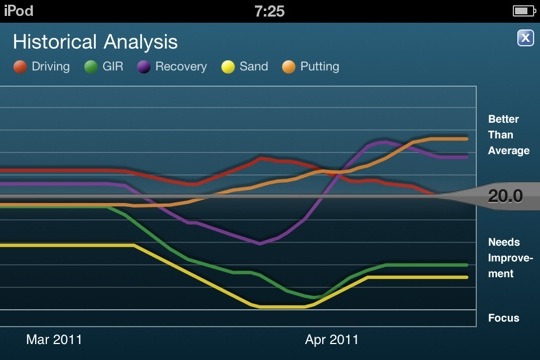
With the advent of Spring and the new golf season, I sat down to figure out the barriers to shooting in the 70’s. All the tools are there: swing, equipment, course, and golf stretching back to my early teens. The biggest impediment, I decided, was my short game and putting. The stats (from Golfshot GPS) don’t lie.
Hearing the ball drop into the cup brings on a Pavlovian reaction...
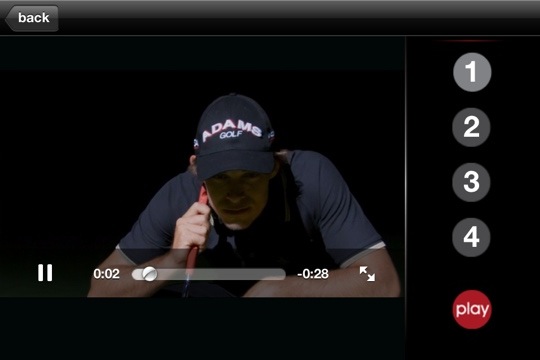
I came across Seeitgolf while downloading the Masters app. It seemed silly at first, watching what amounts to golf porn, with money shot after money shot, but if you put yourself into the correct frame of mind, the imagery and sound of success becomes ingrained.
My first foray after immersing myself in Seeitgolf was typical with usual mix of two and three putts but subsequently on the back nine, I went one under over the last six holes after double and triple bogey to start. I drained 35 footer with seven feet of break uphill for birdie and followed up with an assortment of crazy one and two putts. It seemed natural and I lost the dread of landing my approach off the green -chip on and drain that ten footer.
The app is not entirely intuitive as it seems to have been composed on Flash or some other machination designed to ease app composition. It behaves more like a web site at times.
That said, drilling your mind, which the app says cannot tell between the imagined and the real, has it’s benefits. I strongly recommend this app for people who understand the mental dimensions of the game and can sit through about a half hour of meditative focus.
Putting (in orange) has improved since downloading Seeitgolf App
The statistics from Golfshot app shows my putting performance to have improved into the above average zone (orange line above) since getting Seeitgolf around the time of the Masters. It really works. If they could only add the ability to turn the ball dropping in the hole sound to an alert sound for the iPhone…
disclaimer -I am in no way affiliated with Shotzoom, maker of Golfshot GPS or Golfplan, or their most recent app, Tiger Woods: My Swing. I pay for all of the products I review myself, and am planning to try out this app for a later review along with comparable apps on the store. That said, I thought it would be worthwhile to mention this contest for Tiger Woods memorabilia I received from Shotzoom’s PR folks:
In honor of the start of the Masters tomorrow and to commemorate its partnership with the Tiger Woods Foundation, Shotzoom is giving away one-of-a-kind Tiger Woods memorabilia. From now through April 12, Shotzoom, the leader in active lifestyle mobile applications including Tiger Woods: My Swing, is offering Golfshot community members the chance to win one of six prizes:
· Grand Prize: One winner will receive a 1997 Masters Flag signed by Tiger Woods
· Second Place: Three winners will receive game-worn golf gloves signed by Tiger Woods
· Third Place: Two winners will receive a game-worn golf hat signed by Tiger Woods
To enter, just register at http://golfshot.com/contests/tiger-woods/.
You increase your chances of winning by telling your friends about the new Tiger Woods: My Swing app for the iPhone.
Tiger Woods: My Swing, the first instructional app from Woods, lets golfers capture videos of their swing so they can analyze it, compare it with Woods and their friends, and see their swing improve over time. Woods serves as a virtual coach, teaching golfers how to use swing line analysis and providing tips on specific areas of improvement. Like all of Shotzoom’s golf apps, MySwing integrates with the Golfshot community, the world’s largest active golf community with more than half a million active members. The app is available on iTunes for $9.99, and proceeds from the app benefit the Tiger Woods Foundation.
Addendum: 3/30/2011 -as I await the arrival of my iPad 2, I can now look back at this post and chuckle. In the year since this post, netbooks have tanked as over 15million iPads were sold. While hackintoshing is fun for a while, the stress of upgrading the OS is not, and I sold the netbook, sans OSX. The Macbook Air covers the gaps left by iPad, and in fact, it is fairly rare for me to need a laptop when I have internet access via my iPhone or iPad. The iPad2 will be the 3G version on AT&T -I chose it because I want the flexibility of buying a local provider’s SIM card when I’m abroad. The thing is this -I don’t think that Apple will want to launch iPhone 5 this year, even though most contracts for iPhone cycle around the summer. It’s like giving gifts to a girlfriend -the timing has to be right and given too frequently, you beg for contempt.
If you want to know what the iPhone5 will look like, I think you can see it in both the iPad2 and more importantly the iPod Touch 4G. iPhone5 will be similar to both with metal back and thinner. It will also feature a 4 to 4.5 inch screen. If it is to keep it’s battery life while getting skinny, it will have to get wider and taller. iPhone4 won’t be phased out but will become the cheap phone.
FROM LAST YEAR JANUARY -MARCH, 2010
The iPad launch yesterday was not up to the hype -you needed the device to have time travel capabilities for people to be satisfied. That said, the question for this first adopter among first adopters is, “Where does this fit in my man purse?”
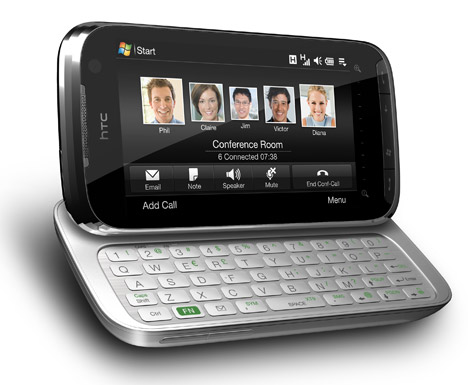
I need portable internet access for many reasons -I write a lot and am working on several research projects as well as need to keep in touch with a vascular team -the iPhone (now disconnected from AT&T) still serves as my primary email device because the HTC TouchPro2 that I have from Verizon has a maddeningly inconsistent email app that jumps between HTC’s beautiful interface and the horrible, ugly Windows Mobile 6.5 bones underneath. Despite this, the TP2 has earned a semi-permanent place because of the $30 app called WalkingHotSpot which will turn the TP2 into a Wifi hotspot.
I have a maxed out dataplan and tethering plan through Verizon, so I am just using the data that I have already purchased, just not for a Windows laptop but also for my iPhone which I can now use again for my golf GPS apps.
The middle spot between a big laptop (my 15inch Macbook Pro) and the iphone is the need to have a bigger screen than my iphone especially for iTunes movies and content, but at the same time having a keyboard, with at least 5 hrs of battery life. The netbooks do fill this niche in terms of hardware very nicely, but the software just isn’t there. I have become very used to iLife and iWork -thinks look prettier and works nicer through these than anything in the Windows or Linux environment.
The solution came in the form of Hackintosh. The Dell Mini 10v is a netbook which seems to have been designed solely for Hackintoshing. Hackintosh is a non-Apple computer made to run Mac OS X. This technically is a breach of the software license, but I own the computer and I own the shrink wrapped software license for this Hackintosh.
With this, I have a portable internet solution that goes 5hrs on battery, and more with the additional battery, all for a total of $400 bucks for the hardware. If you choose to go this route, you should buy the OS license.
This works nicely for now, because Apple didn’t have something that effectively served my needs in this space. Now they have iPad. We won’t be able to get our hands on one for 59 days, 89 if you want the 3G/Wifi version. Maybe my netbook days are numbered.
I’ll tell you why. The trackpad, designed by Dell, is one of the worst pieces of industrial design ever created by humans. Dell, after I ordered the netbook, took my money but didn’t acknowledge I even ordered the netbook until I spent two hours on tech support. It was only through the graces of a very nice lady in India, that I eventually got a netbook 10 days later than promised. The next OS upgrade to 10.6.3 may break the netbook again, requiring another round of hacking, which I used to enjoy, but not so much anymore. The 10inch screen is adequate, but I know, compared to the OLED screen on iPad, it will be like night and day. I see that a lot of people are giving up their netbooks on eBay, and this is most likely because the hardware being, well, not Apple.
So I wait, with my proverbial tent pitched outside our local Apple store.
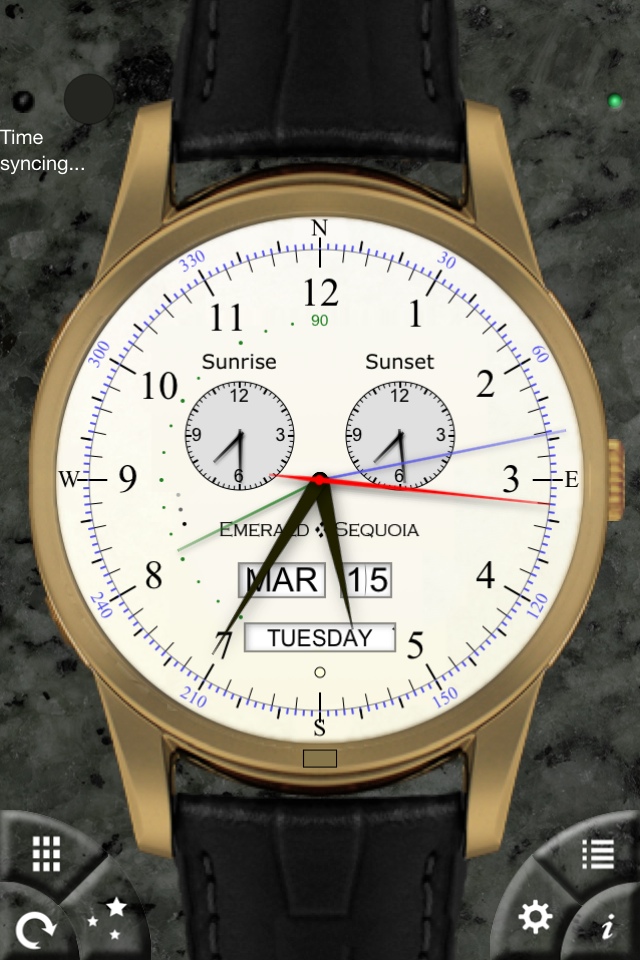
The one thing I want to know during golf season is the hours of sunlight that I have available for play. The Chronometer app available on the iTunes App Store fills this need well. The application offers a variety of virtual watches with a wonderment of complications that at first seem toylike but are really useful. The Haleakala watch gives you the sunrise and sunset times of your location along with the sun and moon azimuths which are useful for navigating the Santa Maria to Cathay. For the avid golfer, twilight on both ends of the day is enough light to play.
This is an excuse given by anti-Apple types who like to say their device is “for business.” It means their way of doing things is for adults. It’s meant to justify complexity and difficulty and excuse monumental blandness.
It originates from the time the first Macintoshes came out with windows and mouse interface, and IBM was DOS only. The idea promulgated at that time was that the command line based computers with their arcane keyboard functions were for the adults, “for business,” while the easier to learn and master Macs were for non-adults, ie the kids. This basic lie has been perpetuated despite the fact that just about every user-interface and design innovation by Apple has been co-opted by the “business” computing industry, starting with Windows 3.1.
That is why I roll my eyes when RIM says their new Playbook tablet is “ready for business,” when many businesses are in the process of adopting iPhones and iPads. When I speak to the medical device sales people, all of them have been begging their IT departments, usually full of people whose lives are invested in this business vs kids divide. Most IT shops are still fixed on managing Windows XP -I suspect because of the costs of upgrading to Windows 7, but also job security involved with managing the bazillion issues surrounding these “business machines.”
I think there should be no such divide. Computers are so weaved into our lives that the devices should easily glide between work and play, like a mullet -business in the front, party in the back.
Addendum: Deutsche Bank shifted its corporate phone from Blackberry to iPhone (link)
The iPad just had printing added with a great deal of restrictions, but there are apps in the App store that will allow for printing on any Wifi enabled printer. After mulling the purchase of one of these apps, I chose not to print it. Printing costs money and resources, and fact is, why print when you can send a PDF or a document? Printing is so 20th century. It is a capitulation to neo-Luddites, and it is with the same intent that Apple basically suggests you don’t waste paper and toner by putting in some road blocks to printing.
I am in general very happy with my Apple products, using it to be productive while enjoying my life through creating and presenting media rather than just being a consumer of it. Apple’s products easily lets you do many things that are difficult with the non-Apple alternatives. That said, I am underwhelmed by the latest update to iLife, in particular because the most useful program, iWeb, has not been updated.
I had been hoping for new HTML 5 tools, and maybe even a way of creating HTML 5 applications for both Mac and iOS. Maybe that’s what they’re cooking and will present it at some later point. But for now, I’m very upset that iWeb was not included in this update.
While I like iWeb -it does not allow for updating the blog off my mobile devices. I have to sit down on my Macbook Pro, which is now mostly a desktop being tethered to hard drives and a second monitor, to do any work when in fact, I would love to be able to update it on the fly like I do this blog or my Medscape blog.
I guess they want me to buy a Macbook Air to do all of this, but would very much like an iOS option. Meh!
When the iPod Touch 4th Generation was announced, it was disappointing to find out that the rear camera would be substantially lower in megapixels and quality than on iPhone 4, and would not feature HDR. HDR is high dynamic range photography. Your eyes are HDR, but a picture from a cameraphone is not because it takes pictures in a single exposure. Too long an exposure and all the dark areas have better detail with washout of lighter areas like the sky or light colored walls with patterns. Too short an exposure, and all the dark areas turn black, but details like clouds and cracks in white stucco come out. HDR is a way of combining elements of two or more pictures where the exposure is optimal for the particular region of the picture.
The result is a mix picture where all the elements in foreground, mid ground, and background get optimal exposure. The iPhone 4 has this mode of image taking -the only drawback is that because two pictures are taken, the camera must stay still. Alas, the iPod Touch did not come with this capability built in, but it wasn’t too soon before an App showed up in the App Store.
Pro HDR is the name of this app, and it’s great. The two images above were taken in the afternoon and the shots while not perfect, are good enough for the web. Pro HDR does a good job of stitching two images into one. At a &2.99, it is a great bargain.
As someone who has suffered from almost a decade of desperately mediocre Window Mobile devices, it was with a specific reason I chose to switch out of iPhone to Verizon’s HTC TouchPro2 last fall. There is a program called Walking Hotspot which turns any WinMo device into a Wifi hotspot and I felt that it would support my iPhone and future devices like the current iPad the best.
The phone turned out to be a load of turd as far as smartphones go, but I blamed it mostly on Microsoft and not HTC. HTC puts a skin called Sense UI on all of its Android devices and a similar skin called TouchFlo on Windows devices, and I turned it off several days ago after finally just being unable to deal with the screen lags and freezes. Lo and behold, underneath all the TouchFlo cosmetics was the outdated and ugly Windows Mobile 6.1, which ran pretty well on this latest and greatest hardware.
So it was a no brainer for me to try the Windows Mobile 6.5 upgrade offered by Verizon. I saw several warnings on blogs that it would slow things terribly, but I sensed that it was the TouchFlo skin and not Windows Mobile. The upgrade went well, and lo and behold, turning off the beautiful TouchFlo skin resulted in a spiffy windows 6.5 smartphone that actually works. The screens snap and the device really does alright with Wifi and Bluetooth, things that it was gasping at before. The browser still sucks compared to Safari on iPhone, but borders on usable to where I no longer use iPhone for email so much.
Which leads me to this conclusion: Microsoft spent a decade missing the opportunity to grab and dominate the smartphone market by creating a horrible interface (6.1 and prior) and then allowing third parties to skin up the phone to copy iPhone without regard to performance or battery life. If 6.5 is any indication, Windows Phone 7 will be a formidable entry to the market, more so than Android which is already confusing because of the plethora of skins, form factors, and OS versions.
I have agonized over this for a while, particularly after being on call and dropping 3 consecutive calls that left me awake and irritated. Luckily, they weren’t critical, but the iPhone, which I love, works very poorly in my house with AT&T. There is a nearby cell tower, and I should get 5 bars of coverage but we are behind a hill and as you enter its shadow, the bars go to zero, and in my house, 2-3 bars is a good day. I know never to take calls from the kitchen but rather run outdoors if the call is critical.
Therefore, I am quitting AT&T and moving to Verizon. I used to be a 10 year Sprint veteran, but their coverage is equally poor. AT&T in its greed sets their phones for almost no roaming and so won’t switch towers even though there are GSM towers within site (T-mobile I guess). So to Verizon I go with their miserable top down approach to smart phones.
They apparently were offered the iPhone but did not want to relinquish controll over the apps.
I know I had sworn off WinMo, but fact is that HTC has hacked up WinMo 6.1 to work almost like the iPhone with its “flo”-ing user interface. What I like is the fact that you can tether the phone or even better, download a software that will let you make the phone a WiFi hotspot which is nice for my laptop. The irony will be that my iPhone will still be in my pocket for use to call out via Skype over Wifi -this works very well.
I’ll review the HTC Touch Pro2 as soon as I get my hands on it. It’s screen is larger and has higher pixel density than iPhone and it has a real keyboard. It has Bluetooth 2.1 which should let me pair all kinds of gadgets to it including a stereo headset and my earpieces (Plantronic Pro 950 which I consider incredible for cancelling outside wind noise).
Verizon will have to change a lot of things to get iPhone and may not have it in its DNA to undergo this change. AT&T deserves a bag of poop delivered on its doorstep on fire for its negligence of establishing bulletproof coverage. These phones are mission critical and need to be on and reliable.
AT&T had its chance -I asked the customer service rep for microcell -to set up a local in-house micro cell tower. But this would only be an admission of defeat for AT&T and it has not release what would be an enabling technology.
So I ring AT&T’s doorbell, light that paper bag full of steaming poo, and run down the street!





 Golfism -life is a metaphor for golf