Paper Camera brings some fun to Android


The picture above is processed from an iPhone picture of the 9th hole at Wakonda Club seen from the driving range. It was processed using an Android app called Paper Camera (available on Android Market). It brings a bit of iPhon-ish fun to Android. It has a packet of desktop quality photo filters that it can run live on your view screen (there is a delay between shutter and access, so kids will not look as they were framed).

The filters are not all black and white, but of the initial shots I’ve taken, the black and white ones have come out the best. For a $1.99 , it turns my Android tablet into a very fun camera, something usually reserved for iPhone.

The camera is an unsung feature of smart phones that iOS has basically covered in terms of quality, convenience, and access with its wonderful pictures and Photostream. But Google is competing with built-in Picasa exporting from its Gallery app. Unfortunately Gallery is a mess as it offers up not just your pictures but also every jpeg available in the drives including those associated with icons and cached web pages. It’s for geeks, but it’s also getting better and more iOS-ish every day.


image

The Unconnected

20111108-123638.jpg

I recently saw advertisement for a 16gB flash drive for $8 and I smiled as I thought about how cheap memory had gotten compared to twelve years ago when I bought a 32mB flash drive for $200. It is a nice benefit of Moore’s law, but it also brought a slight shudder as I thought about its provenance. Several years ago, there was a rash of malware transmitted from flash memory embedded in digital picture frames. It was a ham-handed attempt at infecting computers world wide, but it made me concerned that most of our technology comes from China. It also gave me the idea of maintaining an unconnected computer, one that requires no internet connection and would serve as a repository of important information and private thoughts.

The Chinese understand this issue as a national security one, and recently announced the creation of its first homegrown supercomputer. Less noticed was the fact that all the processors were custom silicon using custom instruction sets -without knowledge of these instructions, it would be devilishly hard to create programs to enter, monitor, and transmit information. It is the ultimate in unconnected computer and its appearance should be as dismaying as finding a black monolith pulsating with data in the Serengeti. With custom silicon and architecture and an unknown operating system -likely a custom written and compiled Unix, this computer stands apart.

My son’s favorite show is Star Wars Clone Wars. The loyal and brave clones in this series are doomed because ultimately, they are designed to betray their Jedi masters when they are most vulnerable. The Sith Lord enacts Order 66, which causes the Clones to turn on their Jedi leaders. It makes me wonder, how much of the processing power in government and military hardware is sourced from China, and if our insistence on transparency, openness, and interconnectedness is an exposed Achilles heel. Is my iPhone really mine, or does it serve several competing masters? Will our next Pearl Harbor or 9/11 be all the electricity and cell service turning off with planes and satellites crashing and my Facebook telling me to go quickly to the place where the planes and satellites will be crashing?

The only way to really know your computer is secure is to make your own computer using chips and circuitry of known provenance. For example, if you created a parallel array of G4 processors made in California with graphics processors made in California, and running an OS that you can inspect line by line and compile yourself, you might be safe. Going further, you can go completely off the grid and eschew technology and society, keeping your own counsel and recording your thoughts in Moleskine notebooks with pencils stolen from golf courses.

Plausible? Of course not. What China has done is create the equivalent structure of a walled city in its completely home-brewed computer. It sends a message and how you interpret it is up to you.

Intersection of Healing and Technology

So much has been written in the short time since Steve Job’s death, that I will refrain from expressing my personal grief at his passing. I just finished his biography by Walter Isaacson. I read between cases and into the night. The most recent memory I have of Steve (he is now all of ours to refer to personally) is watching his introduction of the iPad2, which I watched on-line this past spring. The final image was what stuck with me –the intersection of the liberal arts and technology. That is why Apple products are so wonderful –they liberate the individual to perform insanely great things with computers that were frankly difficult or impossible before. It has also inspired me to think about health care’s relationship to technology.

Modern health care is about delivering technology. I can now repair an abdominal aortic aneurysm with stent grafts delivered via two small incisions smaller than the width of my pinky where traditionally, I had to make a long incision on the belly. These patients go home the next day. Small computers embedded in pacemakers can sense arrhythmias, correct them, and send reports to physicians by internet. Drugs can be tailored to the genetic makeup of tumors. You can have your genome scanned for disease risk.

But in the practice, on the back end, health care is very analog, very dependent on paper and pen, dictation, and text. The best medical notes read like compelling tone poems but can only be composed by direct speech or penmanship. The notes generated with the assistance of computers end up formatted for other computers and insurance companies. I generally skip to the human generated summary section and plan of care, yet even here, most EMRs (electronic medical records) try to parse meaning by stuffing what is analog into digital cubbies. Electronic medical records are ripe for reimagining.

When I want to know the temperature in Orlando, where my father lives, I can ask my smartphone, “What is the weather in Orlando, Florida?” and the temperature pops up along with weather forecast for today, this week, and so on. My email, my contacts, my friends are instantly available. When it comes to my patients, it is an entirely different story.

The problem is that hospital information services serve many needs and therefore devolve into the least common denominator in order to be used in an infinite variety of scenarios. Often, during the course of decades, legacy systems and databases serving different aspects of patient care create an alphabet soup of programs, each with their own security needs and access methods.

For example, in most hospitals, to look up blood tests, you have to log into the computer, then log into several layers of programs then look up the patient, select the correct admission, then select the laboratories -all the while remembering multiple long and complex passwords which you are not allowed to write down. You repeat the process to look up x-ray images, and chart notes from other physicians if they happened to have been scanned in. I can find out the location of every Starbucks in Manhattan and have them mapped out, but checking patient information is a trip back to 1985 in terms of technology. On top of all of this, hospital computer programs are simply ugly. Steve would not approve.

Steve’s philosophy of vertical integration -of creating the software, hardware, store, and services, created simplicity for the end user. It made the technology work magic by being carefully thought out from top to bottom. Simple takes a great deal of effort, but the returns are clear. What a great day it would be if I could just ask my smartphone, “What is Mrs. Smith’s potassium over the past week?” and get an answer.

The answer, of course, is to begin the work needed to get to that point. And that is the great lesson in Steve Job’s life -not fortune, nor influence, but that beautiful simplicity takes a great deal of focus and effort. Thank you Steve for showing us how.

Apple M-Series

20110828-140802.jpg

Apple needs to create a premium product line. BMW has their M series. McDonalds gives you the option to supersize their fries. You can now pay an extra 20 bucks to get seated in the exit aisle on your next flight. So why can’t we have serious upgrade options.

I know that when you buy a Mac, you can upgrade the processors and RAM, tweak the screen, and add software, but what I really want is the stuff out of Apple’s skunk works, some imbalance, a heaping load of cognitive dissonance. You see, the problem I’m having with Apple right now is that it is headed towards becoming General Computers.

Why can’t we have a Macbook Pro Premium with the DVD drive slipped out and the space filled with more battery, maxed out i7 processor, and 16 gigs of RAM with a retina display screen? In matte black. Why can’t we have a limited edition micro-Macbook Air suitable for pocketing with a 7 inch letterbox screen and small but full keyboard (like Psion’s), 24 hour battery life, and an SD card slot. Why can’t we have a limited edition iPod Touch with a 5 inch retina display and impossible thinness? How about an iPod nano phone with a separate, flawless bluetooth headset, that also functions as a wi-fi hotspot for all your iGadgets.

There is a market for these items, in much the same way that there is a market for Ferrari’s and personal submarines. When the overweight lady with crazy hair and too many shopping bag carry ons is poking around on an iPad -it’s not so fun.

Zombie Gunship -a review, and an explanation of why Zombie things relax me

Zombies are definitely putting their stamp on the zeitgeist. Until recently, vampires were all the rage, but they were never my cup of tea. While vampires are about forbidden seduction -think Don Draper and your mom (didn’t know he was a vampire, did you?). The thing that people don’t get about Zombie movies and fiction is that the Zombies aren’t really the center of the action. This was illustrated in one of the finest Zombie movies to date, The Road (didn’t know it was a Zombie movie, did you?). Zombies are the Gom Jabbar of a Humanity Test (didn’t think I’d reference Dune, did you?). Like a round of golf, a person’s response to a Zombie apocalypse is all about character.

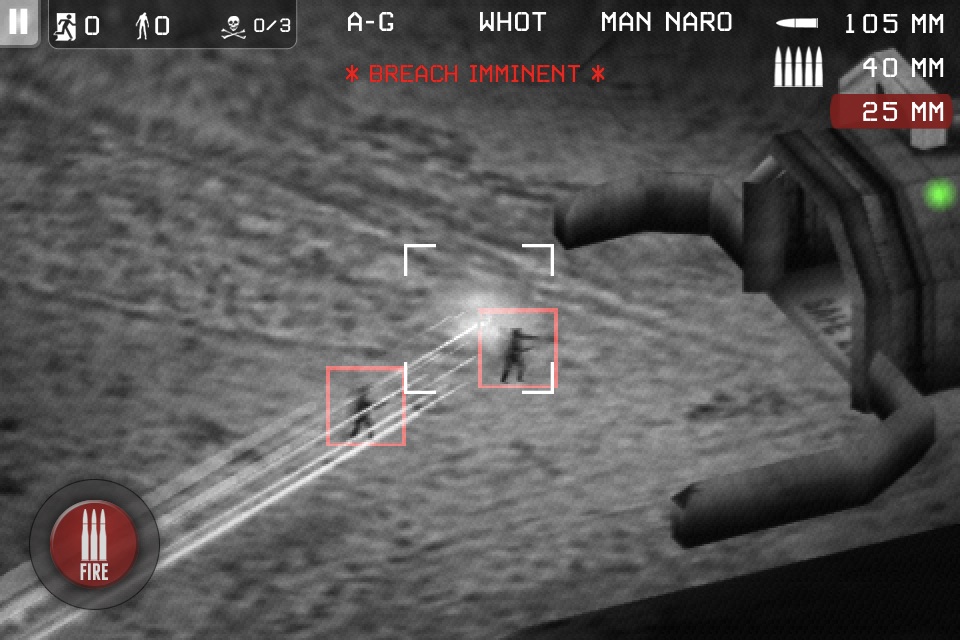
Zombie Gunship is an iOS game that puts you in an orbiting AC130 airplane equipped with mini guns, and two different kinds of cannons. In it, you are the gunnery captain whose task is to obliterate zombies marching on the entrance to a bunker complex. It’s night time, and the battle field is lit up in infrared. Uninfected humans light up the screen bright white, while the walking dead Zombies are a cold black heat sink on IR HUD. Your job is to kill the zombies, keep them from breaching the bunker entrance, but allow the humans through.
The Zombies, when not attacking the bunker, munch on the humans. The problem is that you are allowed to kill only 3 humans inadvertently before it game over -the commander orders you out of the airspace. It’s a simple game with no other characters or maps (a common complaint in the reviews) to mess things up. You gain credits for zombie kills and for each human who make it into the bunker, and you use these to upgrade the weaponry. You can also buy credits through the game (slick) so you can max out the specs on your three gun types (don’t ask me how much I’ve spent).
On an iPhone, the game is a portable addiction like a bag of jelly bellies. On the iPad, it’s engrossing and all consuming, like a really big bag of jelly bellies, and it is the way to play this game. The hook is this. You score better when you ignore the humans and just kill zombies, but then you see the poor blokes getting attacked by the zombies, albeit in tiny ant-sized distance on the infrared. You then are compelled to rescue them with a well gauged barrage from the mini gun, or a carefully distanced blast from the 40mm auto cannon. If you successfully kill the zombie and free the human, you get some points, and praise from the commander. You feel good about yourself in fact. In fact, you end up caring for the poor people running in the night for the shelter of the bunker and may get sidetracked into playing hero. Unfortunately, in this game, and as in all good Zombie movies, playing empathetic hero is not the best way to win at this game. The most efficient at clearing the approaches of zombies without killing yet not rescuing humans do best. There is no punishment for letting Zombie nature take its course.
A recent NYT article (http://www.nytimes.com/2011/08/07/books/review/the-state-of-zombie-literature-an-autopsy.html) pontificated about the Zombie phenomena, tying its popularity to the uncertainties of our times. I would add that Zombies have been with us before Romero created them as the basic fear of being consumed by anything that is not us -whether it is a great white shark, a Tyrannosaur, or an illegal immigrant.
Despite the fearsome images and terrifying drama of good Zombie films and literature, I find them a compelling and a great way to unwind and relax. A Zombie apocalypse, it turns out, does not necessarily favor the strongest or best armed. Rather, aside from a bit of luck, you need your wits. A Zombie armageddon is fair and meritocratic. A level playing field. And who doesn’t like that?

iCloud Glitch!

I’ve been purchasing music from the iTunes store under a single account from way back when, and was excited by the iCloud’s feature allowing me to download purchased tracks on my various iDevices and Mac’s. Unfortunately, when I attempt to do so with tracks purchased prior to this year, iCloud does not recognize the purchase under the account and does not let me download, even though the track shows up in the “purchased” tab on iTunes on my Macs and on my iPods/iPads/iPhones. The support people must be referring to the purchase history seen by iCloud because they claim I did not purchase these tracks when clearly I own them, have them on some devices, and they come up on the “purchased” section of iTunes!


Would like to know if anyone else has seen this.

Golfplan -in app upgrade available tomorrow

20110420-144803.jpgPress release for Golfplan -will have indoor golf drills to hone your game from the inimitable and formidable Mr. Paul Azinger.

SHOTZOOM AND GOLF PRO PAUL AZINGER HELP GOLFERS ACE THEIR GAME

Golfplan with Paul Azinger in-app purchase includes 28 new indoor instructional videos to help amateurs practice their game at home or in the office; Integrates with Golfshot, the world’s largest and most active online golf community

Phoenix, Ariz. – April 21, 2011 – Shotzoom® (www.shotzoom.com), the leader in active lifestyle mobile applications, and Paul Azinger, PGA Pro and victorious Ryder Cup Captain, today announced an in-app purchase to Golfplan with Paul Azinger, the best-selling golf instructional app in the world. Available for the iPhone, iPod touch and iPad, the updated app now includes 28 new instructional videos by Azinger to help amateur golfers practice at home or in the office. G

olfplan integrates with the world’s largest active golf community, Golfshot.com, where members share, compare and chart their golf game statistics, generate customized training plans and receive detailed insight into their performance over time.

20110420-144813.jpg

“I’ve spent thirty years touring and most golfers don’t have a good caddie, statistical charting and expert coaching,” said Azinger. “Golfplan, along with stats kept from Golfshot GPS, offers personalized tips, coaching and drills golfers need to take their game to the next level. And with this update, not getting to the course isn’t an excuse to not practice – rain or shine, anyone can practice with a purpose from their home or office with this app.”

Amongst the 28 new tutorial videos, Azinger demonstrates proper swing path, ways to create lag and proper weight transfer drills. Based on the user’s handicap and Golfshot statistics, Golfplan provides personalized instruction plans to help every golfer improve their game – from shaving strokes off their short game to adding a few extra yards to their tee shot.

“Our apps provide instruction as well as performance statistics that let members track their progress over time and compare results with others,” said Craig Prichard, president of Shotzoom. “The integration with our Golfshot community brings members into a network of highly engaged users with similar interests.”

Features of Golfplan with Paul Azinger include:

– Instructional videos for categories including driving, greens in regulation, short game, bunkers and putting
– Statistics that identify strengths and weaknesses
– Ability to see and track progress over time
– Sharing and feedback tools tied to community members
– Exclusive instruction from Paul Azinger

Golfplan with Paul Azinger integrates with Shotzoom’s Golfshot community, the world’s largest active golf community with more than a half-million active members. Through Golfshot’s suite of products, members have the ability to score and store rounds, gain insight into their game performance, track improvement, share their statistics and compare with community members. Members have played over 50 million holes of golf on 37,000 courses in 152 countries in the 19 months since Golfshot: Golf GPS launched.

Golfplan with Paul Azinger is available for $0.99 in the App Store (www.itunes.com/appstore) for iPhone, iPod touch and iPad. The in-app purchase that includes tips and drills for the home and office is available for $1.99.

About Shotzoom
Shotzoom, LLC creates market leading mobile experiences that empower active lifestyles and enhance the fun of sports and fitness. Its mobile apps integrate with its online participation platform, where people with active lifestyles can track their performance over time, share with friends and interact with members who have similar interests. Shotzoom’s apps include the newly released Tiger Woods: My Swing, the best-selling and top grossing golf GPS app worldwide, Golfshot: Golf GPS, the best-selling golf instructional app worldwide, Golfplan with Paul Azinger, and the most downloaded universal instructional baseball app, Baseball Gameplan with Jason Giambi.


Seeitgolf- a review

With the advent of Spring and the new golf season, I sat down to figure out the barriers to shooting in the 70’s. All the tools are there: swing, equipment, course, and golf stretching back to my early teens. The biggest impediment, I decided, was my short game and putting. The stats (from Golfshot GPS) don’t lie.

Hearing the ball drop into the cup brings on a Pavlovian reaction...

I came across Seeitgolf while downloading the Masters app. It seemed silly at first, watching what amounts to golf porn, with money shot after money shot, but if you put yourself into the correct frame of mind, the imagery and sound of success becomes ingrained.

My first foray after immersing myself in Seeitgolf was typical with usual mix of two and three putts but subsequently on the back nine, I went one under over the last six holes after double and triple bogey to start. I drained 35 footer with seven feet of break uphill for birdie and followed up with an assortment of crazy one and two putts. It seemed natural and I lost the dread of landing my approach off the green -chip on and drain that ten footer.

The app is not entirely intuitive as it seems to have been composed on Flash or some other machination designed to ease app composition. It behaves more like a web site at times.

That said, drilling your mind, which the app says cannot tell between the imagined and the real, has it’s benefits. I strongly recommend this app for people who understand the mental dimensions of the game and can sit through about a half hour of meditative focus.

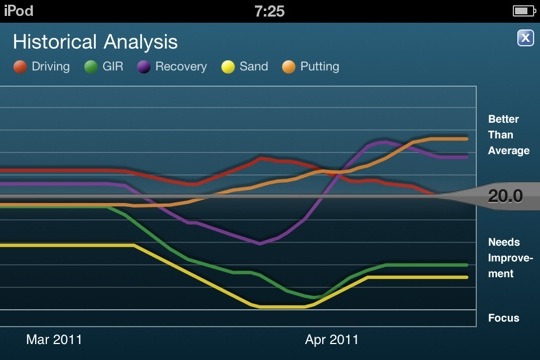
Putting (in orange) has improved since downloading Seeitgolf App

The statistics from Golfshot app shows my putting performance to have improved into the above average zone (orange line above) since getting Seeitgolf around the time of the Masters. It really works. If they could only add the ability to turn the ball dropping in the hole sound to an alert sound for the iPhone…

Contest for Tiger Woods Memorabilia

disclaimer -I am in no way affiliated with Shotzoom, maker of Golfshot GPS or Golfplan, or their most recent app, Tiger Woods: My Swing. I pay for all of the products I review myself, and am planning to try out this app for a later review along with comparable apps on the store. That said, I thought it would be worthwhile to mention this contest for Tiger Woods memorabilia I received from Shotzoom’s PR folks:

In honor of the start of the Masters tomorrow and to commemorate its partnership with the Tiger Woods Foundation, Shotzoom is giving away one-of-a-kind Tiger Woods memorabilia. From now through April 12, Shotzoom, the leader in active lifestyle mobile applications including Tiger Woods: My Swing, is offering Golfshot community members the chance to win one of six prizes:

· Grand Prize: One winner will receive a 1997 Masters Flag signed by Tiger Woods

· Second Place: Three winners will receive game-worn golf gloves signed by Tiger Woods

· Third Place: Two winners will receive a game-worn golf hat signed by Tiger Woods

To enter, just register at http://golfshot.com/contests/tiger-woods/.
You increase your chances of winning by telling your friends about the new Tiger Woods: My Swing app for the iPhone.

Tiger Woods: My Swing, the first instructional app from Woods, lets golfers capture videos of their swing so they can analyze it, compare it with Woods and their friends, and see their swing improve over time. Woods serves as a virtual coach, teaching golfers how to use swing line analysis and providing tips on specific areas of improvement. Like all of Shotzoom’s golf apps, MySwing integrates with the Golfshot community, the world’s largest active golf community with more than half a million active members. The app is available on iTunes for $9.99, and proceeds from the app benefit the Tiger Woods Foundation.